Map the official objectives.
Read the current Microsoft objectives and make a short list of the areas you need to revisit before booking GH-600.
MICROSOFT CERTIFICATION STUDY GUIDE
Demonstrates deep expertise in deploying, operating, integrating, and governing AI agents in production SDLC workflows, ensuring reliability, safety, and speed with GitHub as the control plane.
Download Revizo
Demonstrates deep expertise in deploying, operating, integrating, and governing AI agents in production SDLC workflows, ensuring reliability, safety, and speed with GitHub as the control plane.
Exam details are based on the available Microsoft catalogue information. Confirm current requirements with the exam provider before booking.
Use the provider's current objectives as your source of truth, then organise your Revizo sessions around the Microsoft technologies, product capabilities and implementation decisions named in the certification. The GH-600 exam is listed as Multiple choice and scenario-based questions; your starting point should reflect Experience with SDLC workflows in GitHub, coding agents including GitHub Copilot, and MCP servers.
Read the current Microsoft objectives and make a short list of the areas you need to revisit before booking GH-600.
Select GH-600 in Revizo and use focused question sessions to test one topic or decision type at a time, rather than relying on a single long cram session.
Use your results to return to incorrect answers, revisit the official material behind them and repeat short GH-600 practice sessions until the gaps are clearer.
FREE PRACTICE PREVIEW
Review each question, its correct answer and any available source explanation before continuing your certification study in Revizo.
Answers & available explanations
QUESTION 1
HOTSPOT -
Case study -
This is a case study. Case studies are not timed separately. You can use as much exam time as you would like to complete each case. However, there may be additional case studies and sections on this exam. You must manage your time to ensure that you are able to complete all questions included on this exam in the time provided.
To answer the questions included in a case study, you will need to reference information that is provided in the case study. Case studies might contain exhibits and other resources that provide more information about the scenario that is described in the case study. Each question is independent of the other questions in this case study.
At the end of this case study, a review screen will appear. This screen allows you to review your answers and to make changes before you move to the next section of the exam. After you begin a new section, you cannot return to this section.
To start the case study -
To display the first question in this case study, click the Next button. Use the buttons in the left pane to explore the content of the case study before you answer the questions. Clicking these buttons displays information such as business requirements, existing environment, and problem statements. If the case study has an All Information tab, note that the information displayed is identical to the information displayed on the subsequent tabs. When you are ready to answer a question, click the Question button to return to the question.
Overview -
Contoso Ltd. is a software development company located in the United States.
Existing Environment -
GitHub Environment -
Contoso uses GitHub Enterprise and assigns GitHub Copilot Pro+ licenses to its developers. The developers use Microsoft Visual Studio Code as their IDE.
Contoso has a customer portal. The code for the portal is stored in a GitHub repository named repo1 that contains the following:
A custom agent named agent1 that includes instructions to review specs related to best practices
A custom instruction file named validate-instructions.md that is used to validate tone of voice and applies to all .md and .txt files
A custom instruction file named codereview.instructions.md that is used by the Copilot coding agent but is excluded for use by the Copilot code review repo1 has the following structure:
The front-end is stored in the /frontend folder.
The API logic is stored in the /api folder.
Contoso has a second repository named repo2 that contains a legacy .NET application named App1 built by using .NET 6. repo2 has a multi-agent workflow for modernization tasks.
Contoso enables the Model Context Protocol (MCP) registry and allows the Microsoft Learn MCP Server. Every developer must configure their own connection to the Learn MCP Server.
Problem Statements -
The developers working in repo1 report that the Microsoft Learn documentation is NOT being retrieved when they attempt to validate a design by using agent1.
The testing team at Contoso identifies that the customer portal uses inconsistent UI styles, which leads to customer confusion and branding issues. The UI inconsistencies stem from variations in the folder structure.
Agent Logs -
You have the following logs for the multi-agent workflow used in repo2.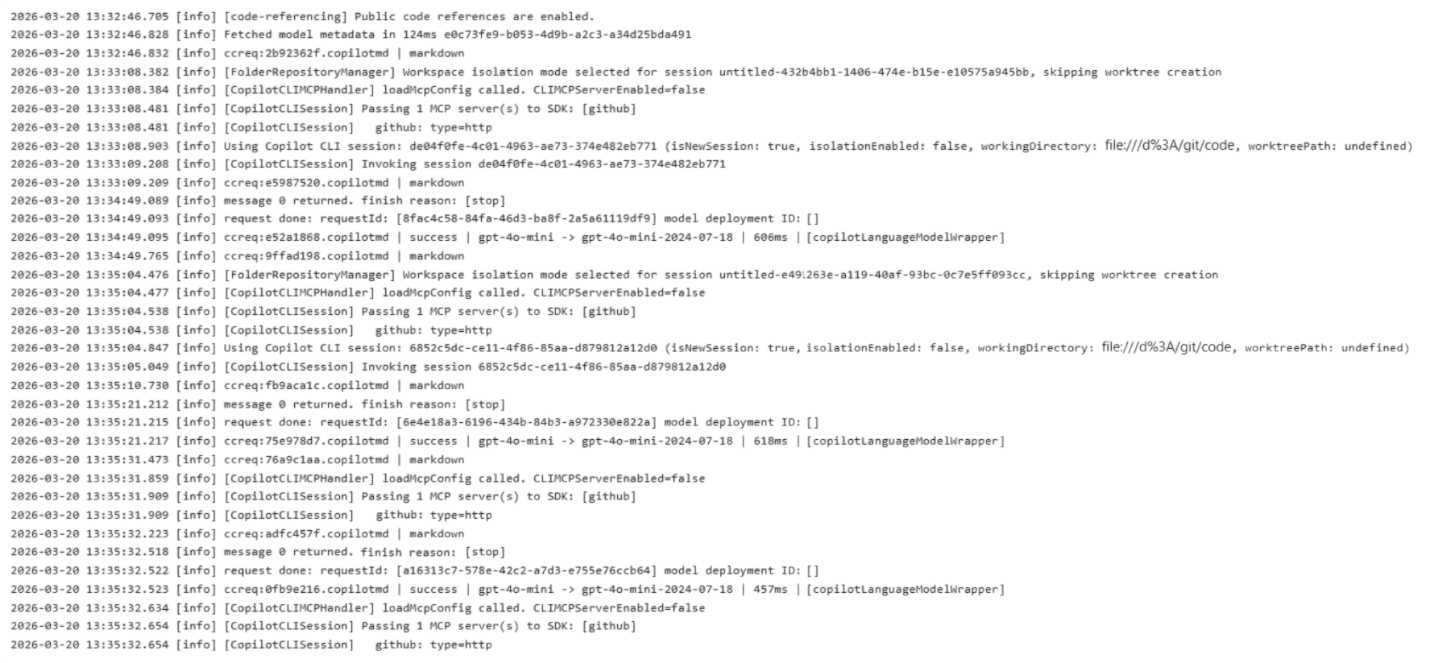
Requirements -
Planned Changes -
Contoso plans to have all agents and developers in repo1 use the Microsoft Learn MCP to ensure that reviews are validated by using the appropriate documentation. This must be implemented centrally.
Contoso plans to leverage AI-powered coding agents to implement new portal features and pages.
Technical Requirements -
App1 must be upgraded to .NET 10. A previous upgrade attempt was started by using the Copilot modernization agent, but the attempt was never finalized.
You plan to retry the upgrade. You must first analyze App1 by using AI, and then generate a report that contains breaking changes and deprecated patterns before retrying the upgrade.
All AI-generated code for UI styling must adhere to a predefined folder structure.
The architects at Contoso need help building implementation plans for repo1. The company wants to implement a new agent named agent2 to analyze the code base and the code requirements, and then respond with a detailed plan. The agent must NOT be able to edit files or run local commands.
The developers must be able to delegate work to the Copilot coding agent by assigning issues to the agent.
You need to implement agent2 to meet the technical requirements.
How should you complete the YAML configuration? To answer, drag the appropriate values to the correct targets. Each value may be used once, more than once, or not at all. You may need to drag the split bar between panes or scroll to view content.
NOTE: Each correct selection is worth one point.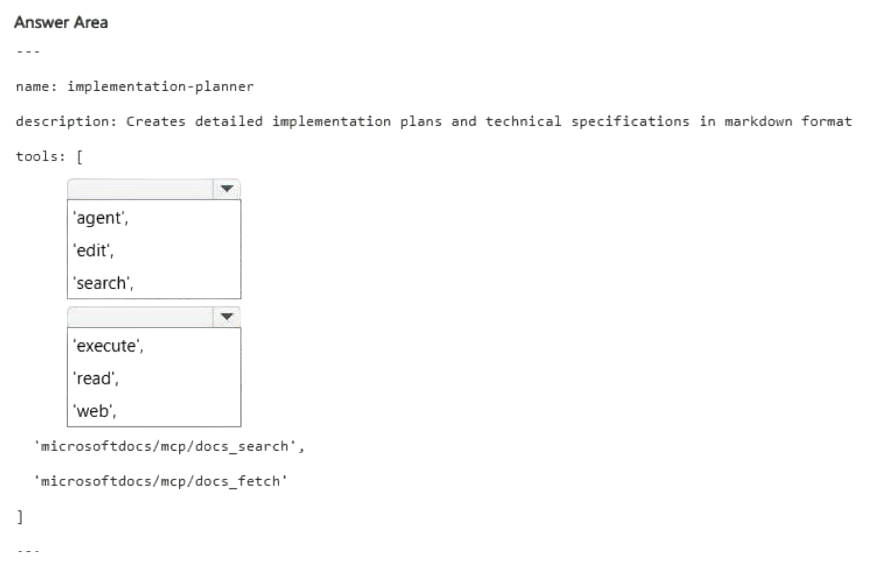
Correct answer: Item 1: C · Item 2: B
QUESTION 2
Case study -
This is a case study. Case studies are not timed separately. You can use as much exam time as you would like to complete each case. However, there may be additional case studies and sections on this exam. You must manage your time to ensure that you are able to complete all questions included on this exam in the time provided.
To answer the questions included in a case study, you will need to reference information that is provided in the case study. Case studies might contain exhibits and other resources that provide more information about the scenario that is described in the case study. Each question is independent of the other questions in this case study.
At the end of this case study, a review screen will appear. This screen allows you to review your answers and to make changes before you move to the next section of the exam. After you begin a new section, you cannot return to this section.
To start the case study -
To display the first question in this case study, click the Next button. Use the buttons in the left pane to explore the content of the case study before you answer the questions. Clicking these buttons displays information such as business requirements, existing environment, and problem statements. If the case study has an All Information tab, note that the information displayed is identical to the information displayed on the subsequent tabs. When you are ready to answer a question, click the Question button to return to the question.
Overview -
Contoso Ltd. is a software development company located in the United States.
Existing Environment -
GitHub Environment -
Contoso uses GitHub Enterprise and assigns GitHub Copilot Pro+ licenses to its developers. The developers use Microsoft Visual Studio Code as their IDE.
Contoso has a customer portal. The code for the portal is stored in a GitHub repository named repo1 that contains the following:
A custom agent named agent1 that includes instructions to review specs related to best practices
A custom instruction file named validate-instructions.md that is used to validate tone of voice and applies to all .md and .txt files
A custom instruction file named codereview.instructions.md that is used by the Copilot coding agent but is excluded for use by the Copilot code review repo1 has the following structure:
The front-end is stored in the /frontend folder.
The API logic is stored in the /api folder.
Contoso has a second repository named repo2 that contains a legacy .NET application named App1 built by using .NET 6. repo2 has a multi-agent workflow for modernization tasks.
Contoso enables the Model Context Protocol (MCP) registry and allows the Microsoft Learn MCP Server. Every developer must configure their own connection to the Learn MCP Server.
Problem Statements -
The developers working in repo1 report that the Microsoft Learn documentation is NOT being retrieved when they attempt to validate a design by using agent1.
The testing team at Contoso identifies that the customer portal uses inconsistent UI styles, which leads to customer confusion and branding issues. The UI inconsistencies stem from variations in the folder structure.
Agent Logs -
You have the following logs for the multi-agent workflow used in repo2.
Requirements -
Planned Changes -
Contoso plans to have all agents and developers in repo1 use the Microsoft Learn MCP to ensure that reviews are validated by using the appropriate documentation. This must be implemented centrally.
Contoso plans to leverage AI-powered coding agents to implement new portal features and pages.
Technical Requirements -
App1 must be upgraded to .NET 10. A previous upgrade attempt was started by using the Copilot modernization agent, but the attempt was never finalized.
You plan to retry the upgrade. You must first analyze App1 by using AI, and then generate a report that contains breaking changes and deprecated patterns before retrying the upgrade.
All AI-generated code for UI styling must adhere to a predefined folder structure.
The architects at Contoso need help building implementation plans for repo1. The company wants to implement a new agent named agent2 to analyze the code base and the code requirements, and then respond with a detailed plan. The agent must NOT be able to edit files or run local commands.
The developers must be able to delegate work to the Copilot coding agent by assigning issues to the agent.
Before App1 is upgraded, you need to verify each individual upgrade step and whether all tests have passed.
Which file should you use?
Correct answer: D
QUESTION 3
DRAG DROP -
You have a GitHub repository that has a GitHub Actions workflow. The workflow runs an AI agent.
You need to ensure that the default GITHUB_TOKEN permissions are read-only, and write access is granted to only the job that performs repository write operations. The workflow must be able to create and approve pull requests only when explicitly enabled.
How should you complete the workflow? To answer, drag the appropriate values to the correct targets. Each value may be used once, more than once, or not at all. You may need to drag the split bar between panes or scroll to view content.
NOTE: Each correct selection is worth one point.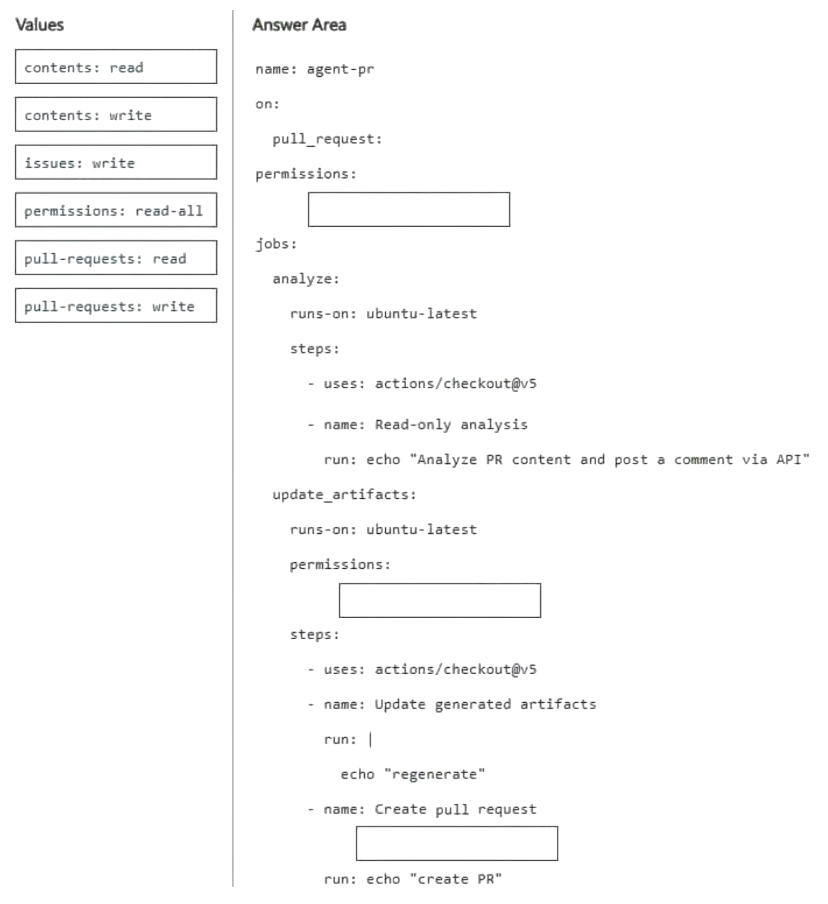
Correct answer: Item 1: D · Item 2: B · Item 3: F
QUESTION 4
DRAG DROP -
You have a GitHub repository that uses the GitHub Copilot coding agent to resolve issues and create draft pull requests. The repository uses GitHub Actions for CI, and reviewers rely on pull request timelines and workflow artifacts to understand what the agent did.
During long-running agent tasks, the reviewers lose track of decisions and validation steps, which causes repeated questions and reworks when context drifts between iterations.
You need to persist task progress and decisions as durable artifacts and ensure that the reviewers can verify what the agent did during and after execution by using GitHub as the system of record.
What should you do for each requirement? To answer, drag the appropriate actions to the correct requirements. Each action may be used once, more than once, or not at all. You may need to drag the split bar between panes or scroll to view content.
NOTE: Each correct selection is worth one point.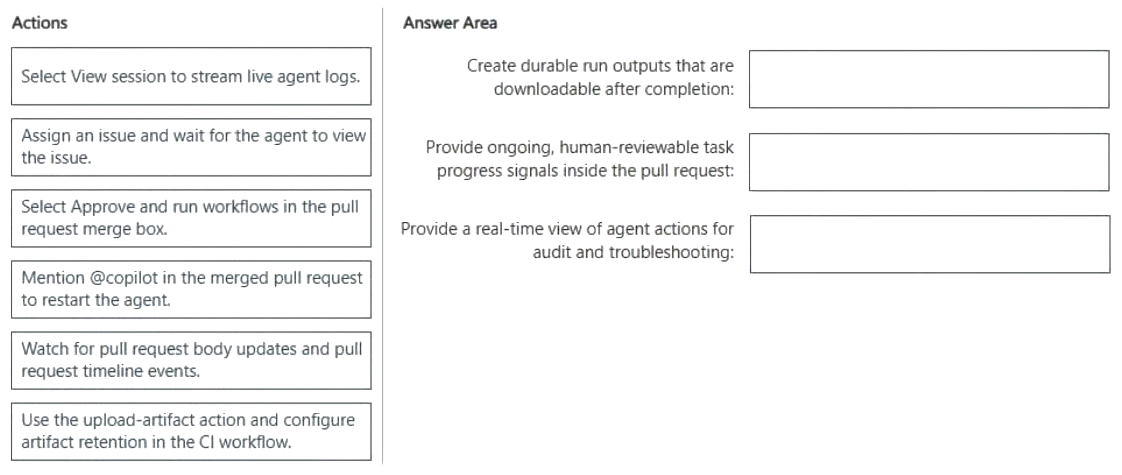
Correct answer: Item 1: F · Item 2: E · Item 3: A
QUESTION 5
DRAG DROP -
You have a GitHub Enterprise Cloud Organization that uses the GitHub Copilot coding agent to resolve issues asynchronously.
When an issue is assigned to GitHub Copilot, the agent creates a draft pull request, but your team cannot always tell whether the agent is actively working, has completed its session, or is awaiting workflow approval.
Which execution context does each signal indicate? To answer, drag the appropriate context to the correct signals. Each signal may be used once, more than once, or not at all. You may need to drag the split bar between panes or scroll to view content.
NOTE: Each correct selection is worth one point.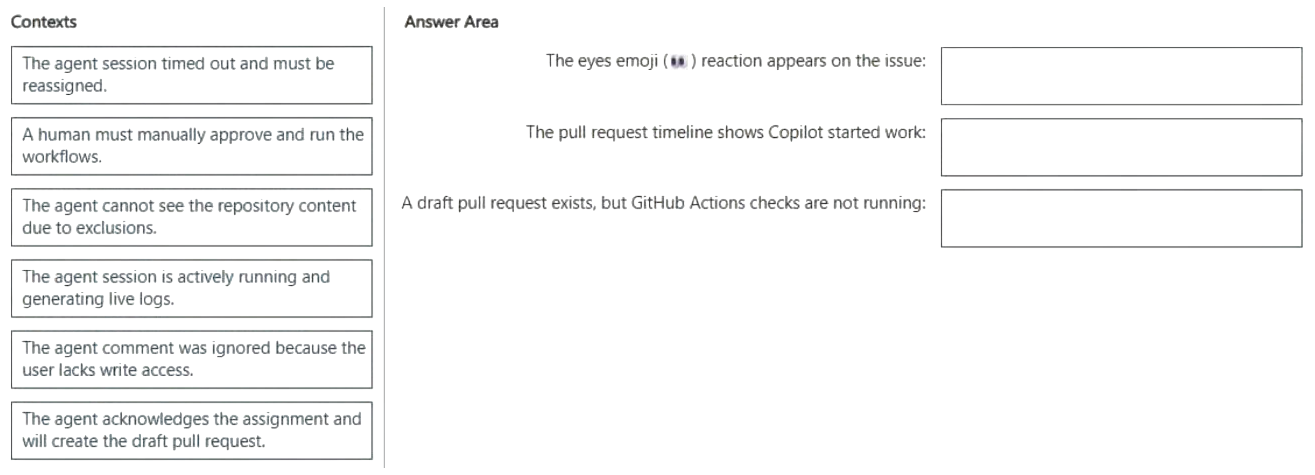
Correct answer: Item 1: F · Item 2: D · Item 3: B
QUESTION 6
You have a repository that uses the GitHub Copilot coding agent and supports hooks stored under .github/hooks.
You need a Shell command to run automatically whenever an agent execution fails.
Which type of hook should you use?
Correct answer: C
QUESTION 7
You are about to start a complex refactoring task in the GitHub Copilot CLI.
Before Copilot makes any changes, you need to review and agree on the approach.
What should you do first?
Correct answer: C
QUESTION 8
A team assigns an issue to the GitHub Copilot coding agent by using the following one-line description: Fix the login bug.
Copilot creates a pull request, but the pull request is missing changes and has an incorrect scope.
How should you resolve the issue?
Correct answer: C
QUESTION 9
Case study -
This is a case study. Case studies are not timed separately. You can use as much exam time as you would like to complete each case. However, there may be additional case studies and sections on this exam. You must manage your time to ensure that you are able to complete all questions included on this exam in the time provided.
To answer the questions included in a case study, you will need to reference information that is provided in the case study. Case studies might contain exhibits and other resources that provide more information about the scenario that is described in the case study. Each question is independent of the other questions in this case study.
At the end of this case study, a review screen will appear. This screen allows you to review your answers and to make changes before you move to the next section of the exam. After you begin a new section, you cannot return to this section.
To start the case study -
To display the first question in this case study, click the Next button. Use the buttons in the left pane to explore the content of the case study before you answer the questions. Clicking these buttons displays information such as business requirements, existing environment, and problem statements. If the case study has an All Information tab, note that the information displayed is identical to the information displayed on the subsequent tabs. When you are ready to answer a question, click the Question button to return to the question.
Existing Environment -
GitHub Environment -
The GitHub environment contains the following:
Three repositories named product-api, billing-service, and infra-terraform.
Branch protection on the main branch in all repositories that requires at least one pull request review before merging
GitHub Actions runners used across all workflows
A GitHub team named SG_Dev that contains developers
A GitHub team named SG_Review that contains senior engineers and a security team
A .github/copilot-instructions.md file that includes general coding conventions for all features
Agent environment -
The product-api repository uses a GitHub Copilot coding agent named agent1 that has the following configurations:
No custom agent profile is defined.
A Model Context Protocol (MCP) server named MCP1 is deployed to https://mcp.litwareinc.internal and provides access to internal ticketing and deployment APIs. MCP1 requires an API key for authentication.
A second Copilot coding agent named agent2 handles changes in infra-terraform and runs in parallel with agent1 when both agents have open assigned issues.
Copilot memory is NOT enabled for the organization.
Problem Statements -
Litware identifies the following issues:
During two recent sessions, agent1 accessed files in billing-service, which is outside the agent's intended scope. agent1 makes code changes immediately after receiving a task.
A developer named Ben, who is on the SG_Dev team, reports that agent1 completed a session with a successful status and opened a pull request, but the pull request contains no file changes. Other developers report this intermittently as well.
Both agent1 and agent2 modified shared/config.yaml in a parallel test run, generating conflicting outputs. agent1 consistently uses raw try-catch blocks for error handling, which violates the defined implementation guidelines of SG_Dev.
Requirements -
Planned Changes -
Litware plans to make the following changes:
Ensure that agent1 can access all the tools in the environment.
Provide product-api with specific instructions to agent1 without affecting Copilot Chat or Copilot code review.
Configure MCP1 as a tool for agent1 by modifying the product-api repository MCP configuration.
Ensure that Copilot retains details that it has learned and uses that knowledge for future work. This must be applied to all licensed members of the organization.
Implementation guidelines -
The development team at Litware identifies the following implementation guidelines:
Agent workflows must be able to run in parallel.
Application error handling must use the repository ErrorHandler class. agent1 and agent2 must run on isolated branches during parallel execution. File-level conflicts must be detected before merges, and both agents must be able to run concurrently.
Security requirements -
Litware identifies the following security requirements:
Only the members of SG_Review must be able to approve agent1 plan outputs.
All API keys must be stored and accessed securely.
The developers must NOT be able to self-approve.
Agent configuration -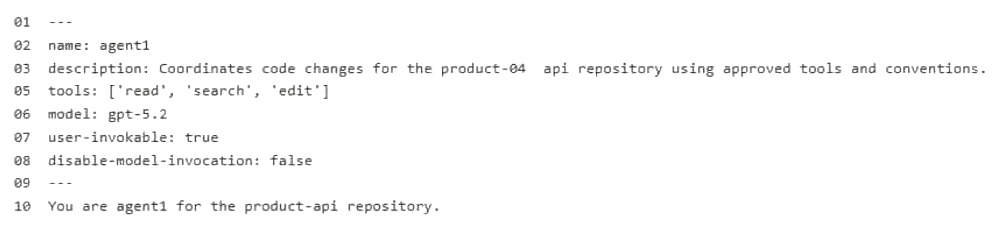
You need to configure agent1 to support the planned changes.
What should you do?
Correct answer: D
QUESTION 10
Case study -
This is a case study. Case studies are not timed separately. You can use as much exam time as you would like to complete each case. However, there may be additional case studies and sections on this exam. You must manage your time to ensure that you are able to complete all questions included on this exam in the time provided.
To answer the questions included in a case study, you will need to reference information that is provided in the case study. Case studies might contain exhibits and other resources that provide more information about the scenario that is described in the case study. Each question is independent of the other questions in this case study.
At the end of this case study, a review screen will appear. This screen allows you to review your answers and to make changes before you move to the next section of the exam. After you begin a new section, you cannot return to this section.
To start the case study -
To display the first question in this case study, click the Next button. Use the buttons in the left pane to explore the content of the case study before you answer the questions. Clicking these buttons displays information such as business requirements, existing environment, and problem statements. If the case study has an All Information tab, note that the information displayed is identical to the information displayed on the subsequent tabs. When you are ready to answer a question, click the Question button to return to the question.
Existing Environment -
GitHub Environment -
The GitHub environment contains the following:
Three repositories named product-api, billing-service, and infra-terraform.
Branch protection on the main branch in all repositories that requires at least one pull request review before merging
GitHub Actions runners used across all workflows
A GitHub team named SG_Dev that contains developers
A GitHub team named SG_Review that contains senior engineers and a security team
A .github/copilot-instructions.md file that includes general coding conventions for all features
Agent environment -
The product-api repository uses a GitHub Copilot coding agent named agent1 that has the following configurations:
No custom agent profile is defined.
A Model Context Protocol (MCP) server named MCP1 is deployed to https://mcp.litwareinc.internal and provides access to internal ticketing and deployment APIs. MCP1 requires an API key for authentication.
A second Copilot coding agent named agent2 handles changes in infra-terraform and runs in parallel with agent1 when both agents have open assigned issues.
Copilot memory is NOT enabled for the organization.
Problem Statements -
Litware identifies the following issues:
During two recent sessions, agent1 accessed files in billing-service, which is outside the agent's intended scope. agent1 makes code changes immediately after receiving a task.
A developer named Ben, who is on the SG_Dev team, reports that agent1 completed a session with a successful status and opened a pull request, but the pull request contains no file changes. Other developers report this intermittently as well.
Both agent1 and agent2 modified shared/config.yaml in a parallel test run, generating conflicting outputs. agent1 consistently uses raw try-catch blocks for error handling, which violates the defined implementation guidelines of SG_Dev.
Requirements -
Planned Changes -
Litware plans to make the following changes:
Ensure that agent1 can access all the tools in the environment.
Provide product-api with specific instructions to agent1 without affecting Copilot Chat or Copilot code review.
Configure MCP1 as a tool for agent1 by modifying the product-api repository MCP configuration.
Ensure that Copilot retains details that it has learned and uses that knowledge for future work. This must be applied to all licensed members of the organization.
Implementation guidelines -
The development team at Litware identifies the following implementation guidelines:
Agent workflows must be able to run in parallel.
Application error handling must use the repository ErrorHandler class. agent1 and agent2 must run on isolated branches during parallel execution. File-level conflicts must be detected before merges, and both agents must be able to run concurrently.
Security requirements -
Litware identifies the following security requirements:
Only the members of SG_Review must be able to approve agent1 plan outputs.
All API keys must be stored and accessed securely.
The developers must NOT be able to self-approve.
Agent configuration -
You need to provide access to the API key of MCP1. The solution must meet the security requirements.
What should you do?
Correct answer: B
QUESTION 11
HOTSPOT -
Case study -
This is a case study. Case studies are not timed separately. You can use as much exam time as you would like to complete each case. However, there may be additional case studies and sections on this exam. You must manage your time to ensure that you are able to complete all questions included on this exam in the time provided.
To answer the questions included in a case study, you will need to reference information that is provided in the case study. Case studies might contain exhibits and other resources that provide more information about the scenario that is described in the case study. Each question is independent of the other questions in this case study.
At the end of this case study, a review screen will appear. This screen allows you to review your answers and to make changes before you move to the next section of the exam. After you begin a new section, you cannot return to this section.
To start the case study -
To display the first question in this case study, click the Next button. Use the buttons in the left pane to explore the content of the case study before you answer the questions. Clicking these buttons displays information such as business requirements, existing environment, and problem statements. If the case study has an All Information tab, note that the information displayed is identical to the information displayed on the subsequent tabs. When you are ready to answer a question, click the Question button to return to the question.
Existing Environment -
GitHub Environment -
The GitHub environment contains the following:
Three repositories named product-api, billing-service, and infra-terraform.
Branch protection on the main branch in all repositories that requires at least one pull request review before merging
GitHub Actions runners used across all workflows
A GitHub team named SG_Dev that contains developers
A GitHub team named SG_Review that contains senior engineers and a security team
A .github/copilot-instructions.md file that includes general coding conventions for all features
Agent environment -
The product-api repository uses a GitHub Copilot coding agent named agent1 that has the following configurations:
No custom agent profile is defined.
A Model Context Protocol (MCP) server named MCP1 is deployed to https://mcp.litwareinc.internal and provides access to internal ticketing and deployment APIs. MCP1 requires an API key for authentication.
A second Copilot coding agent named agent2 handles changes in infra-terraform and runs in parallel with agent1 when both agents have open assigned issues.
Copilot memory is NOT enabled for the organization.
Problem Statements -
Litware identifies the following issues:
During two recent sessions, agent1 accessed files in billing-service, which is outside the agent's intended scope. agent1 makes code changes immediately after receiving a task.
A developer named Ben, who is on the SG_Dev team, reports that agent1 completed a session with a successful status and opened a pull request, but the pull request contains no file changes. Other developers report this intermittently as well.
Both agent1 and agent2 modified shared/config.yaml in a parallel test run, generating conflicting outputs. agent1 consistently uses raw try-catch blocks for error handling, which violates the defined implementation guidelines of SG_Dev.
Requirements -
Planned Changes -
Litware plans to make the following changes:
Ensure that agent1 can access all the tools in the environment.
Provide product-api with specific instructions to agent1 without affecting Copilot Chat or Copilot code review.
Configure MCP1 as a tool for agent1 by modifying the product-api repository MCP configuration.
Ensure that Copilot retains details that it has learned and uses that knowledge for future work. This must be applied to all licensed members of the organization.
Implementation guidelines -
The development team at Litware identifies the following implementation guidelines:
Agent workflows must be able to run in parallel.
Application error handling must use the repository ErrorHandler class. agent1 and agent2 must run on isolated branches during parallel execution. File-level conflicts must be detected before merges, and both agents must be able to run concurrently.
Security requirements -
Litware identifies the following security requirements:
Only the members of SG_Review must be able to approve agent1 plan outputs.
All API keys must be stored and accessed securely.
The developers must NOT be able to self-approve.
Agent configuration -
You are evaluating how agent1 will behave after you implement the planned changes.
For each of the following statements, select Yes if the statement is true. Otherwise, select No.
NOTE: Each correct selection is worth one point.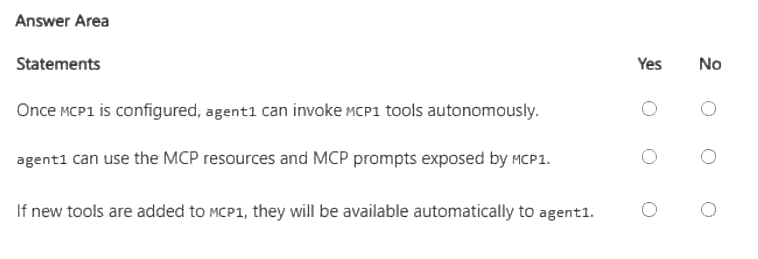
Correct answer: Y, Y, Y
QUESTION 12
Case study -
This is a case study. Case studies are not timed separately. You can use as much exam time as you would like to complete each case. However, there may be additional case studies and sections on this exam. You must manage your time to ensure that you are able to complete all questions included on this exam in the time provided.
To answer the questions included in a case study, you will need to reference information that is provided in the case study. Case studies might contain exhibits and other resources that provide more information about the scenario that is described in the case study. Each question is independent of the other questions in this case study.
At the end of this case study, a review screen will appear. This screen allows you to review your answers and to make changes before you move to the next section of the exam. After you begin a new section, you cannot return to this section.
To start the case study -
To display the first question in this case study, click the Next button. Use the buttons in the left pane to explore the content of the case study before you answer the questions. Clicking these buttons displays information such as business requirements, existing environment, and problem statements. If the case study has an All Information tab, note that the information displayed is identical to the information displayed on the subsequent tabs. When you are ready to answer a question, click the Question button to return to the question.
Overview -
Contoso Ltd. is a software development company located in the United States.
Existing Environment -
GitHub Environment -
Contoso uses GitHub Enterprise and assigns GitHub Copilot Pro+ licenses to its developers. The developers use Microsoft Visual Studio Code as their IDE.
Contoso has a customer portal. The code for the portal is stored in a GitHub repository named repo1 that contains the following:
A custom agent named agent1 that includes instructions to review specs related to best practices
A custom instruction file named validate-instructions.md that is used to validate tone of voice and applies to all .md and .txt files
A custom instruction file named codereview.instructions.md that is used by the Copilot coding agent but is excluded for use by the Copilot code review repo1 has the following structure:
The front-end is stored in the /frontend folder.
The API logic is stored in the /api folder.
Contoso has a second repository named repo2 that contains a legacy .NET application named App1 built by using .NET 6. repo2 has a multi-agent workflow for modernization tasks.
Contoso enables the Model Context Protocol (MCP) registry and allows the Microsoft Learn MCP Server. Every developer must configure their own connection to the Learn MCP Server.
Problem Statements -
The developers working in repo1 report that the Microsoft Learn documentation is NOT being retrieved when they attempt to validate a design by using agent1.
The testing team at Contoso identifies that the customer portal uses inconsistent UI styles, which leads to customer confusion and branding issues. The UI inconsistencies stem from variations in the folder structure.
Agent Logs -
You have the following logs for the multi-agent workflow used in repo2.
Requirements -
Planned Changes -
Contoso plans to have all agents and developers in repo1 use the Microsoft Learn MCP to ensure that reviews are validated by using the appropriate documentation. This must be implemented centrally.
Contoso plans to leverage AI-powered coding agents to implement new portal features and pages.
Technical Requirements -
App1 must be upgraded to .NET 10. A previous upgrade attempt was started by using the Copilot modernization agent, but the attempt was never finalized.
You plan to retry the upgrade. You must first analyze App1 by using AI, and then generate a report that contains breaking changes and deprecated patterns before retrying the upgrade.
All AI-generated code for UI styling must adhere to a predefined folder structure.
The architects at Contoso need help building implementation plans for repo1. The company wants to implement a new agent named agent2 to analyze the code base and the code requirements, and then respond with a detailed plan. The agent must NOT be able to edit files or run local commands.
The developers must be able to delegate work to the Copilot coding agent by assigning issues to the agent.
You need to make changes to repo1 to support the planned changes for the agents.
What should you modify?
Correct answer: C
QUESTION 13
You have a GitHub repository.
You use the GitHub Copilot CLI to run an agentic workflow from the terminal.
During execution, the conversation history approaches the context limit. The agent cannot continue the current session unless the amount of retained context is reduced.
You need to continue the current session without losing all the prior progress.
Which Copilot CLI slash command should you run?
Correct answer: D
QUESTION 14
You have a GitHub Enterprise repository.
An agent opens pull requests to the main branch.
You need to ensure that changes to .github/workflows/* and /infra/* require approval from designated reviewers before merge.
What should you configure?
Correct answer: C
QUESTION 15
HOTSPOT -
You have a GitHub repository that uses the following GrtHub Copilot CLI command in a Bash script.
For each of the following statements, select Yes if the statement is true. Otherwise, select No.
NOTE: Each correct selection is worth one point.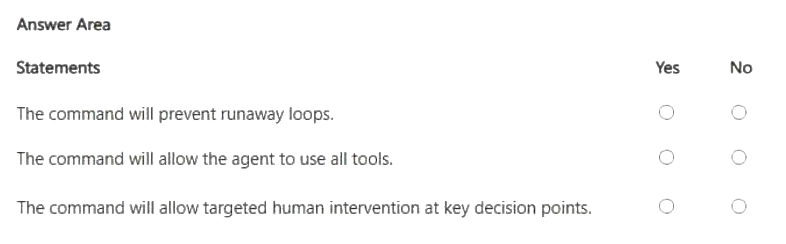
Correct answer: Y, Y, N
QUESTION 16
HOTSPOT -
You have a GitHub repository that uses GitHub Actions for CI.
Your team is piloting the GitHub Copilot coding agent to autonomously create branches and open pull requests. The repository follows trunk-based development that uses main as the default branch.
You need to ensure that the agent meets the following requirements:
Changes to main can occur only by using pull requests that have at least one approval.
When a pull request is opened, a validation workflow runs, and the agent can still create branches and open pull requests autonomously.
How should you configure the repository? To answer, select the appropriate options in the answer area.
NOTE: Each correct selection is worth one point.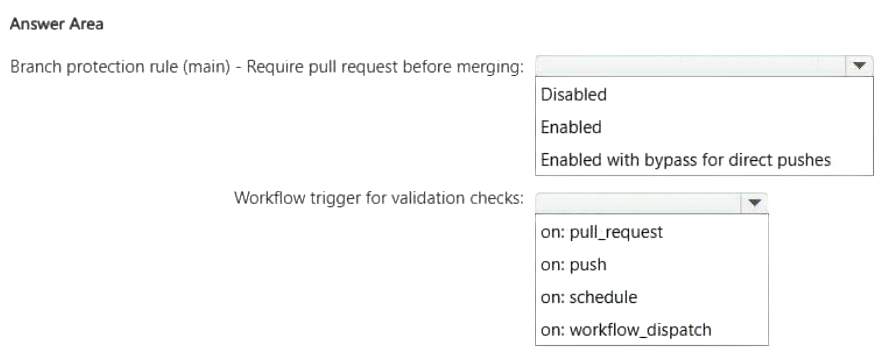
Correct answer: Item 1: B · Item 2: A
QUESTION 17
You have a repository on github.com that uses the GitHub Copilot coding agent.
You also use the GitHub Copilot CLI locally to reproduce failures and continue the same work from your terminal.
You need to verify the current token usage.
Which Copilot CLI slash command should you run?
Correct answer: C
QUESTION 18
DRAG DROP -
Your team uses a remote GitHub Model Context Protocol (MCP) server for workflows in the software development life cycle (SDLC).
You need to commit a workspace-scoped MCP configuration to ensure that GitHub Copilot can connect to the GitHub-hosted MCP endpoint and authenticate by using a GitHub personal access token (PAT).
How should you complete the mcp.json configuration file? To answer, drag the appropriate values to the correct targets. Each value may be used once, more than once, or not at all. You may need to drag the split bar between panes or scroll to view content.
NOTE: Each correct selection is worth one point.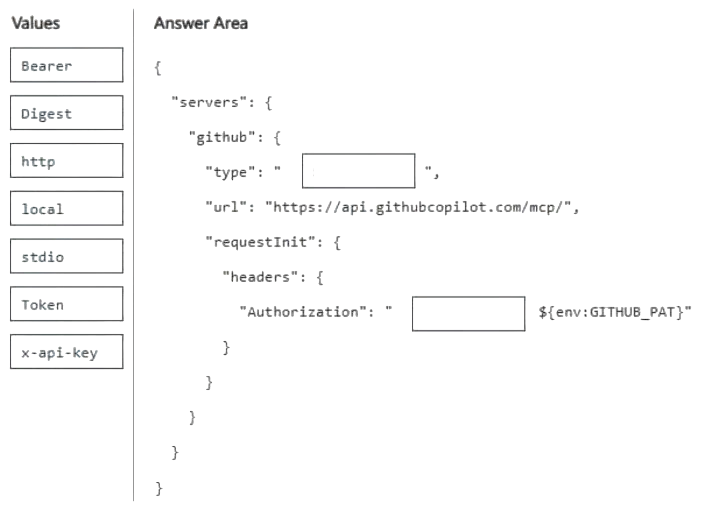
Correct answer: Item 1: C · Item 2: A
QUESTION 19
You have a GitHub Copilot coding agent named CodeAgent. The .agent.md file of CodeAgent contains the following YAML frontmatter.
---
name: CodeAgent
description: Performs repository analysis and code review tasks. tools: ['edit', 'execute', 'read', 'search']
---
You need to issue a GitHub Copilot CLI command that preserves execution velocity for read-only tasks by eliminating approval prompts for low-risk tools. The solution must ensure that high-risk tools that can make changes remain available but still require explicit user approval before running.
Which command should you run?
Correct answer: E
QUESTION 20
DRAG DROP -
You have a GitHub repository that uses GitHub Actions for CI on pull requests.
You have a GitHub Copilot coding agent that opens pull requests for backlog items, and your company requires automated checks for agent-generated changes.
You plan to standardize success criteria so that pull requests created by agents only succeed when unit tests pass and CodeQL analysis completes.
You need to configure a GitHub Actions workflow that runs on pull requests, executes unit tests, and performs CodeQL analysis.
How should you complete the workflow? To answer, drag the appropriate values to the correct targets. Each value may be used once, more than once, or not at all. You may need to drag the split bar between panes or scroll to view content.
NOTE: Each correct selection is worth one point.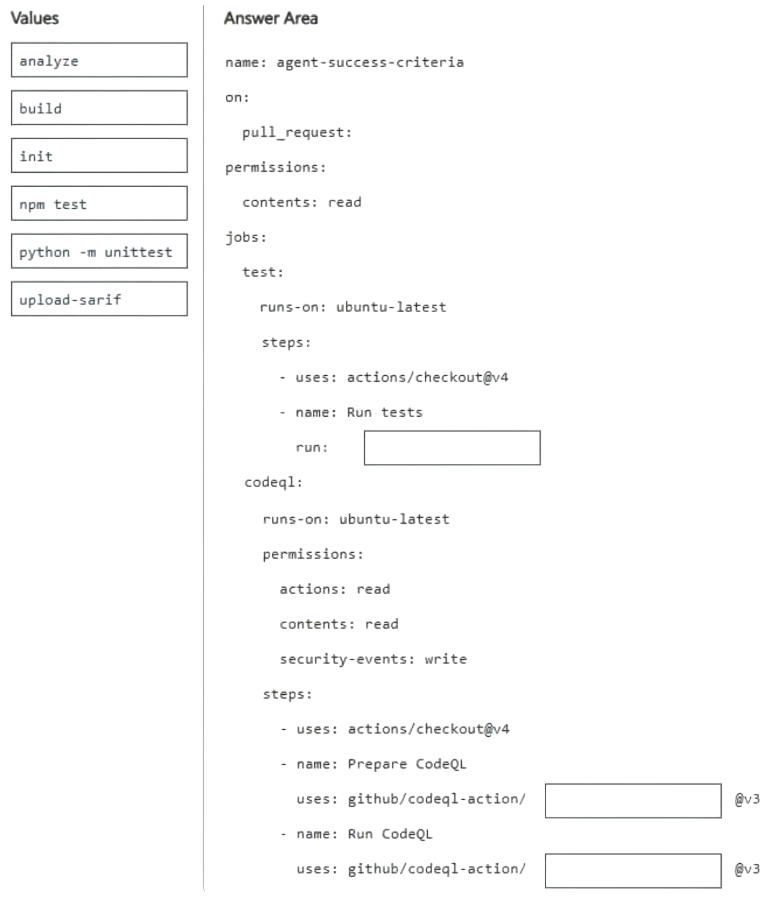
Correct answer: Item 1: D · Item 2: C · Item 3: A
Choose GH-600 in Revizo and work through original, question-by-question practice on your iPhone. Review results, revisit what needs attention and keep your next session tied to one specific certification objective.
Practise GH-600 with RevizoNo. Revizo is an independent iPhone app for certification practice. Refer to the provider's official resources for current exam policies and registration.
Use the exam code to select the matching certification in Revizo, then build short, focused sessions around the areas you want to review.
No. Revizo provides original practice questions for certification study. Use the provider's official objectives, documentation and policies as the source of truth for your preparation.
Use the current Microsoft objectives, documentation and registration guidance as your source of truth. Revizo is designed to support focused practice, not replace the provider's official materials.
Check the official Microsoft exam page for the latest objectives, registration details and policies.