Revizo / Microsoft / AB-650

MICROSOFT CERTIFICATION STUDY GUIDE

AB-650 practice questions.
Prepare with a clearer plan.

Validates ability to configure, manage, secure, and govern Microsoft 365 tenants, workloads, and AI services, including Microsoft 365 Copilot, agents, and connected AI capabilities.

Download Revizo
Revizo certification practice question on iPhone

What to know about AB-650.

Validates ability to configure, manage, secure, and govern Microsoft 365 tenants, workloads, and AI services, including Microsoft 365 Copilot, agents, and connected AI capabilities.

Format
Multiple choice and scenario-based questions (single and multiple response)
Duration
120 minutes
Passing score
700/1000
Recommended experience
Experience with Microsoft 365 workloads and Microsoft Entra ID; understanding of Defender XDR capabilities; familiarity with Microsoft Graph PowerShell

Exam details are based on the available Microsoft catalogue information. Confirm current requirements with the exam provider before booking.

How to prepare for AB-650.

Use the provider's current objectives as your source of truth, then organise your Revizo sessions around the Microsoft technologies, product capabilities and implementation decisions named in the certification. The AB-650 exam is listed as Multiple choice and scenario-based questions (single and multiple response); your starting point should reflect Experience with Microsoft 365 workloads and Microsoft Entra ID; understanding of Defender XDR capabilities; familiarity with Microsoft Graph PowerShell.

01

Map the official objectives.

Read the current Microsoft objectives and make a short list of the areas you need to revisit before booking AB-650.

02

Practise one area at a time.

Select AB-650 in Revizo and use focused question sessions to test one topic or decision type at a time, rather than relying on a single long cram session.

03

Review, then repeat.

Use your results to return to incorrect answers, revisit the official material behind them and repeat short AB-650 practice sessions until the gaps are clearer.

FREE PRACTICE PREVIEW

Read the first 20
AB-650 questions.

Review each question, its correct answer and any available source explanation before continuing your certification study in Revizo.

FIRST 20 QUESTIONS

Answers & available explanations

QUESTION 1

HOTSPOT -
This is a case study. Case studies are not timed separately from other exam sections. You can use as much exam time as you would like to complete each case study. However, there might be additional case studies or other exam sections. Manage your time to ensure that you can complete all the exam sections in the time provided. Pay attention to the Exam Progress at the top of the screen so you have sufficient time to complete any exam sections that follow this case study.
To answer the case study questions, you will need to reference information that is provided in the case. Case studies and associated questions might contain exhibits or other resources that provide more information about the scenario described in the case. Information provided in an individual question does not apply to the other questions in the case study.
A Review Screen will appear at the end of this case study. From the Review Screen, you can review and change your answers before you move to the next exam section. After you leave this case study, you will NOT be able to return to it.

To start the case study -
To display the first question in this case study, select the “Next” button. To the left of the question, a menu provides links to information such as business requirements, the existing environment, and problem statements. Please read through all this information before answering any questions. When you are ready to answer a question, select the “Question” button to return to the question.
Contoso, Ltd. is a consulting company that has a main office in San Francisco and a branch office in Dallas.

Existing Environment -

Microsoft Entra configuration -
Contoso has an Azure subscription.
Contoso has a Microsoft 365 E5 subscription.
Contoso has a Microsoft Entra tenant named contoso.com. The tenant has an administrative unit named AU1 that contains the following membership rule.
(device.deviceTrustType –eq “Workplace”) and (device.deviceOSType –in [“Windows”, “Android”])
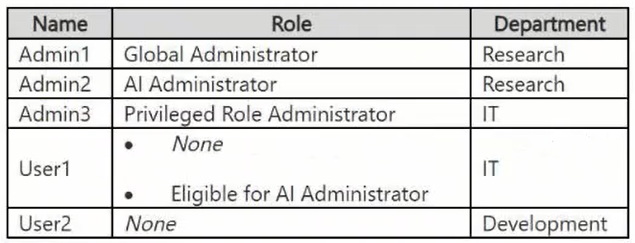
The tenant contains the cloud-only users shown in the following table.
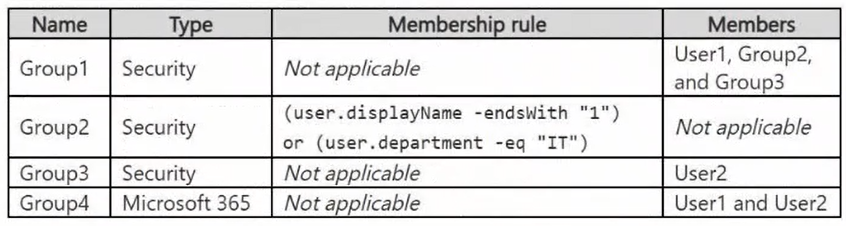
The tenant contains the groups shown in the following table.
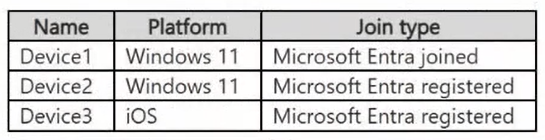
The tenant contains the devices shown in the following table.
All the devices are managed by using Microsoft Intune.
Microsoft Entra authentication methods
Contoso contains an Authentication methods policy for Microsoft Authenticator that has the following settings:

Include: Group1 -

Exclude: Group3 -
Authentication mode: Passwordless
Privileged Identity Management (PIM) configuration
Privileged roles are managed by using Privileged Identity Management (PIM).
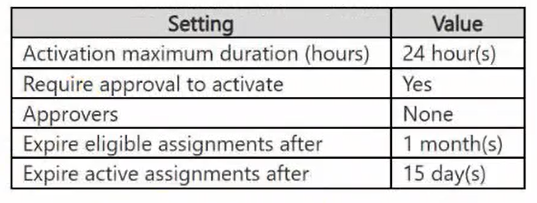
The PIM settings for the AI Administrator role are configured as shown in the following table.

Email configuration -
Each user has a Microsoft Exchange mailbox.
Contoso contains an anti-spam outbound policy named Antispam1 that has the following configurations:

Included groups: Group4 -

Excluded users: User2 -
Set an external message limit: 3
Set an internal message limit: 5

Set a daily message limit: 13 -
Restriction placed on users who reach the message limit: Restrict the user from sending mail
Microsoft SharePoint configuration
Contoso has a Microsoft SharePoint site named Site1 that stores the following types of content and various other documents:
Project documents: All the documents have a project code that includes the letters PR, followed by a dash and nine digits (for example PR-123456789).
Proposal documents: All the documents have a customer ID that includes seven to 10 alphanumerical characters. All the customer IDs are recorded in a Microsoft Excel workbook.
Feedback forms: All the documents were created by using the same template.

Microsoft AI services -
Contoso implements the following Microsoft AI services:
Microsoft 365 Copilot for selected users
Microsoft Foundry agents, including an agent named Agent1

Requirements -

Planned changes -
Contoso plans to implement the following changes:
Issue new Android devices to the Group1 users.
Assign Microsoft 365 Copilot licenses to the users in Group1.
Add an additional email address alias for the users in Group4.
Create a Conditional Access policy named CAPolicy1 for Group3.
Disable web search for Microsoft 365 Copilot and Microsoft 365 Copilot Chat.
Create classifiers to identify project documents and proposal documents stored on Site1.

Technical requirements -
Contoso identifies the following technical requirements:
The users in Group3 that access Microsoft 365 resources from anonymous IP addresses must complete multifactor authentication (MFA).
Microsoft 365 Copilot responses must NOT use content from the project documents stored on Site1.
Microsoft 365 Copilot responses must use content from only Microsoft 365 locations.
The total costs of Agent1 must be monitored and evaluated monthly.
All the Android devices must be registered in Microsoft Entra.
Administrative effort must be minimized.
Administrative costs must be minimized.
You need to evaluate the configuration of AU1.
For each of the following statements, select Yes if the statement is true. Otherwise, select No.
NOTE: Each correct selection is worth one point.
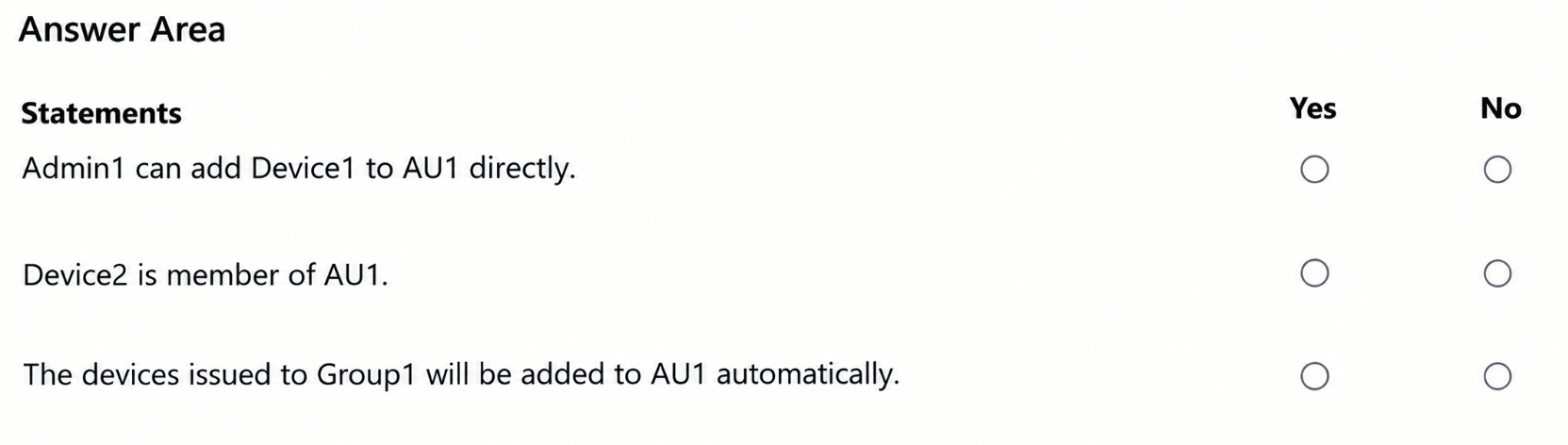
  1. AAdmin1 can add Device1 to AU1 directly.
  2. BDevice2 is member of AU1.
  3. CThe devices issued to Group1 will be added to AU1 automatically.
Show answer & explanation

Correct answer: N, Y, Y

ExplanationAU1 is a dynamic administrative unit because it is defined by the membership rule (device.deviceTrustType -eq "Workplace") and (device.deviceOSType -in ["Windows", "Android"]). Membership of a dynamic administrative unit is calculated by Microsoft Entra ID only, so no administrator, not even the Global Administrator Admin1, can add Device1 (or any device) manually, which makes the first statement false. In device rules, deviceTrustType has the value Workplace for Microsoft Entra registered devices, AzureAD for Microsoft Entra joined devices, and ServerAD for Microsoft Entra hybrid joined devices. Device2 is a Windows 11 device that is Microsoft Entra registered, so it matches both clauses of the rule and is a member of AU1, which makes the second statement true. The planned change issues new Android devices to the Group1 users and the technical requirements state that all Android devices must be registered in Microsoft Entra, so those devices will also have deviceTrustType Workplace and deviceOSType Android and will be added to AU1 automatically by the dynamic membership processing, which makes the third statement true. See https://learn.microsoft.com/en-us/entra/identity/role-based-access-control/admin-units-members-dynamic

QUESTION 2

DRAG DROP -
You have a Microsoft 365 subscription.
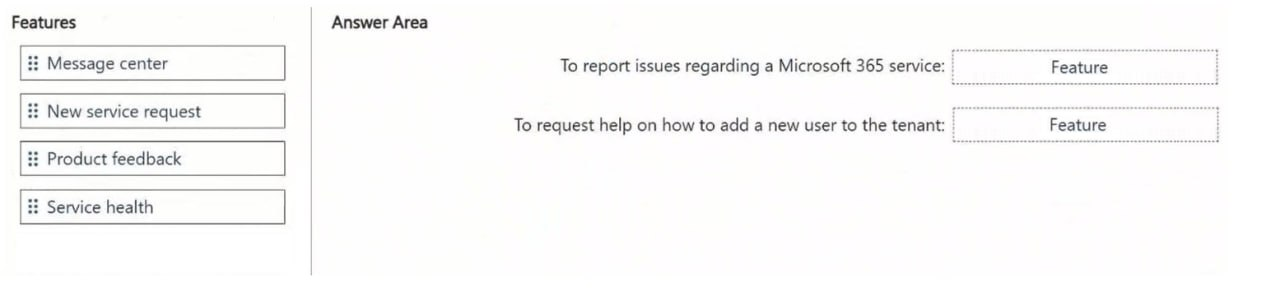
You need to meet the following requirements.
Report a Microsoft 365 service issue.
Request help on how to add a new user to a Microsoft Entra tenant.
What should you use in the Microsoft 365 admin center? To answer, drag the appropriate features to the correct requirements. Each feature may be used once, more than once, or not at all. You may need to drag the split bar between panes or scroll to view content.
NOTE: Each correct selection is worth one point.
Item 1

  1. AA. Message center
  2. BB. New service request
  3. CC. Product feedback
  4. DD. Service health

Item 2

  1. AA. Message center
  2. BB. New service request
  3. CC. Product feedback
  4. DD. Service health
Show answer & explanation

Correct answer: Item 1: D · Item 2: B

ExplanationOn the Health > Service health page of the Microsoft 365 admin center, an admin who experiences a problem that is not already published as an incident or advisory selects Report an issue and completes the short form; Microsoft correlates the report with signals from other tenants and tracks it on the Reported issues tab, so Service health is the feature used to report a Microsoft 365 service issue. A how-to question such as how to add a new user to the Microsoft Entra tenant is not a service outage, so it is raised with Microsoft Support by opening a New service request from Support > Help & support. Message center only publishes announcements about upcoming changes, and Product feedback sends suggestions to the product group. See https://learn.microsoft.com/en-us/microsoft-365/enterprise/view-service-health

QUESTION 3

You have a Microsoft 365 E5 subscription and use Microsoft Intune for managing mobile devices.
You need to access service health alerts from a mobile phone.
What should you use?

  1. AA. The Microsoft 365 Admin app
  2. BB. The Microsoft Authenticator app
  3. CC. The Microsoft Defender portal
  4. DD. The Microsoft Intune Company Portal app
Show answer & explanation

Correct answer: A

ExplanationThe Microsoft 365 Admin app (available for iOS and Android) gives administrators mobile access to core admin center capabilities, including Service health and Message center, and it can send push notifications when a service incident or advisory is posted. The Company Portal app is for end users to enroll and access company apps, Microsoft Authenticator handles MFA and passwordless sign-in, and the Microsoft Defender portal is a security portal that does not provide the tenant service health dashboard for Microsoft 365 services on a phone. See https://learn.microsoft.com/en-us/microsoft-365/admin/admin-overview/admin-mobile-app

QUESTION 4

HOTSPOT -
Your company has a Microsoft 365 subscription that contains the domains shown in the following exhibit.
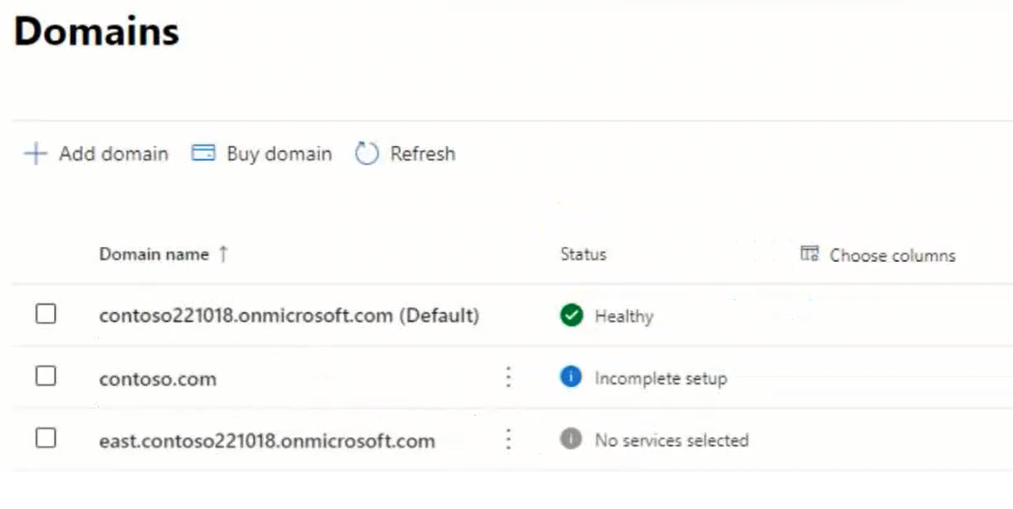
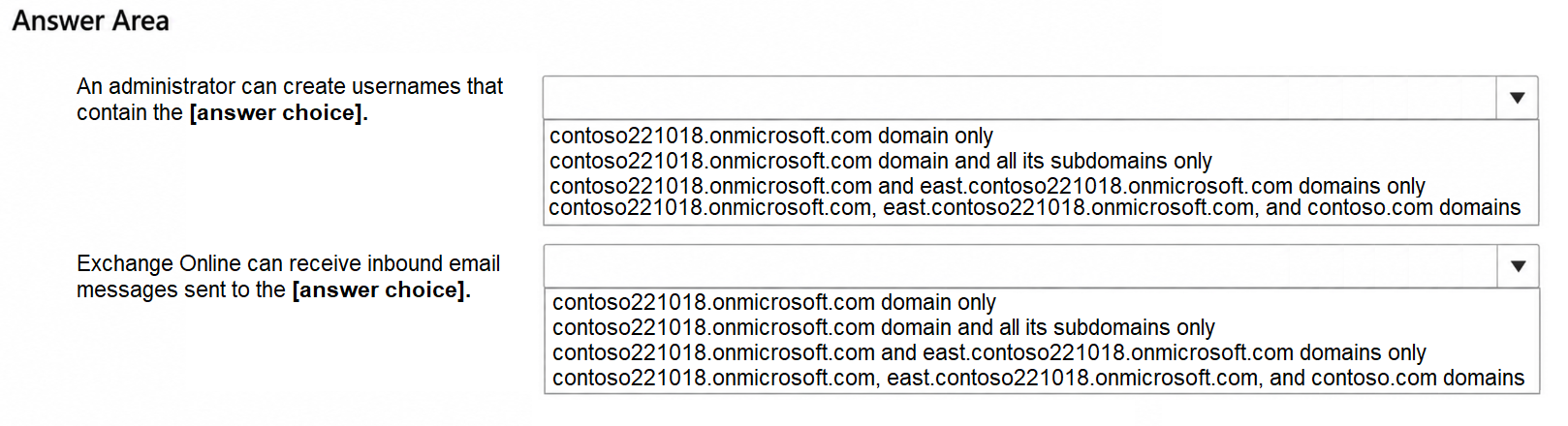
Use the drop-down menus to select the answer choice that completes each statement based on the information presented in the graphic.
NOTE: Each correct selection is worth one point.
Item 1

  1. AA. contoso221018.onmicrosoft.com domain only
  2. BB. contoso221018.onmicrosoft.com domain and all its subdomains only
  3. CC. contoso221018.onmicrosoft.com and east.contoso221018.onmicrosoft.com domains only
  4. DD. contoso221018.onmicrosoft.com, east.contoso221018.onmicrosoft.com, and contoso.com domains

Item 2

  1. AA. contoso221018.onmicrosoft.com domain only
  2. BB. contoso221018.onmicrosoft.com domain and all its subdomains only
  3. CC. contoso221018.onmicrosoft.com and east.contoso221018.onmicrosoft.com domains only
  4. DD. contoso221018.onmicrosoft.com, east.contoso221018.onmicrosoft.com, and contoso.com domains
Show answer & explanation

Correct answer: Item 1: C · Item 2: A

ExplanationA domain suffix can be used in a user name only after the domain is usable in the tenant. The default domain contoso221018.onmicrosoft.com is Healthy and east.contoso221018.onmicrosoft.com is a subdomain of a Microsoft-owned onmicrosoft.com namespace, so it is verified automatically and is also offered in the domain list when you create a user; contoso.com is still in Incomplete setup, so its DNS setup has not been finished and it cannot be used for user names. Receiving inbound mail additionally requires the Exchange Online service to be enabled for the domain so that it becomes an accepted domain with the correct MX record. Only contoso221018.onmicrosoft.com is fully set up; east.contoso221018.onmicrosoft.com shows No services selected (Exchange is not enabled for it) and contoso.com shows Incomplete setup (the mail records were never completed), so neither domain accepts inbound email. See https://learn.microsoft.com/en-us/microsoft-365/admin/setup/add-domain

QUESTION 5

HOTSPOT -
You have a Microsoft 365 E5 subscription that contains a user named User1.
You need to perform the following actions:
Create a shared mailbox named Mbox1 in the subscription.
Grant User1 the Send As permission for Mbox1.
Which Microsoft 365 portals can you use to perform each task? To answer, select the appropriate options in the answer area.
NOTE: Each correct selection is worth one point.
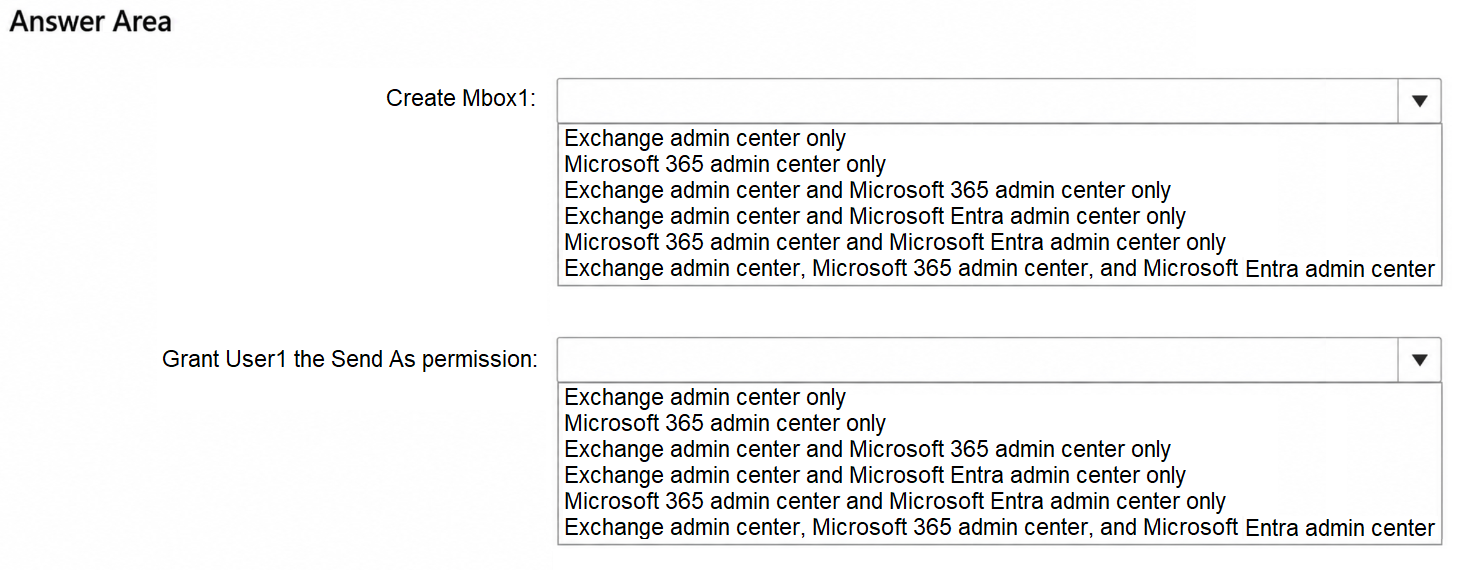
Item 1

  1. AA. Exchange admin center only
  2. BB. Microsoft 365 admin center only
  3. CC. Exchange admin center and Microsoft 365 admin center only
  4. DD. Exchange admin center and Microsoft Entra admin center only
  5. EE. Microsoft 365 admin center and Microsoft Entra admin center only
  6. FF. Exchange admin center, Microsoft 365 admin center, and Microsoft Entra admin center

Item 2

  1. AA. Exchange admin center only
  2. BB. Microsoft 365 admin center only
  3. CC. Exchange admin center and Microsoft 365 admin center only
  4. DD. Exchange admin center and Microsoft Entra admin center only
  5. EE. Microsoft 365 admin center and Microsoft Entra admin center only
  6. FF. Exchange admin center, Microsoft 365 admin center, and Microsoft Entra admin center
Show answer & explanation

Correct answer: Item 1: C · Item 2: C

ExplanationA shared mailbox can be created from Teams & groups > Shared mailboxes in the Microsoft 365 admin center or from Recipients > Mailboxes > Add a shared mailbox in the Exchange admin center. Delegation of the shared mailbox, including Send as, is also available in both portals: the Microsoft 365 admin center exposes Read and manage, Send as, and Send on behalf on the shared mailbox properties, and the Exchange admin center exposes the same delegation under the mailbox Delegation tab. The Microsoft Entra admin center manages identities and groups and cannot create Exchange mailboxes or grant mailbox permissions, so it is excluded from both answers. See https://learn.microsoft.com/en-us/microsoft-365/admin/email/create-a-shared-mailbox

QUESTION 6

You have a Microsoft 365 subscription.
Your company has multiple branch offices, including a branch office named Branch1. The users in Branch1 connect to Microsoft 365 by using a corporate web proxy.
On the Network connectivity page in the Microsoft 365 admin center, Branch1 displays the following network insight:
“We’re detecting WebSocket (WSS) connection failures to the domain: *.cloud.microsoft, which causes Copilot to not work correctly for your users.”
HTTPS access to Microsoft 365 apps from Branch1 succeeds.
You need to resolve the insight without changing connectivity for the other branch offices.
What should you configure?

  1. AA. A conditional forwarder for cloud.microsoft on the Branch1 DNS servers
  2. BB. A tenant-wide firewall rule that allows TCP port 443 to the Microsoft 365 IP address ranges
  3. CC. The Branch1 web proxy to allow WebSocket (WSS) protocol upgrades for connections to *.cloud.microsoft
  4. DD. TLS inspection for *.cloud.microsoft on the Branch1 web proxy
Show answer & explanation

Correct answer: C

ExplanationThe network insight reports WSS (WebSocket Secure) failures rather than HTTPS failures, and HTTPS access from Branch1 already works, so name resolution and TCP 443 connectivity are fine. Microsoft 365 Copilot experiences require the connection to be upgraded to a WebSocket against *.cloud.microsoft, and the documented cause of this insight is a web proxy that blocks the WebSocket protocol upgrade (or breaks it through TLS inspection or aggressive timeouts). The remediation is to configure the web proxy infrastructure that serves the affected location so that WebSocket upgrades are permitted to hosts in *.cloud.microsoft, which fixes Branch1 without altering connectivity for the other offices. Enabling TLS inspection would make the problem worse, and a tenant-wide firewall or DNS change does not address the blocked protocol upgrade. See https://learn.microsoft.com/en-us/microsoft-365/enterprise/office-365-network-mac-perf-connection-blockers

QUESTION 7

You have a Microsoft 365 subscription that has an initial domain named contoso.onmicrosoft.com and two verified custom domains named contoso.com and fabrikam.com.
The contoso.com domain is NOT the default domain. No users, groups, or applications reference contoso.com.
The subscription contains the administrator accounts shown in the following table.
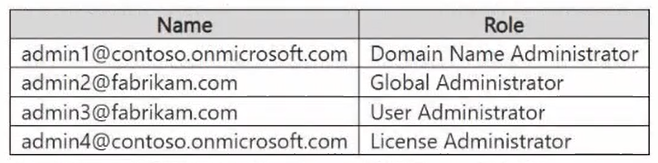
You need to delete contoso.com by using an account that is assigned the minimum required Microsoft Entra role.
Which account should you use?

  1. AA. [email protected]
  2. BB. [email protected]
  3. CC. [email protected]
  4. DD. [email protected]
Show answer & explanation

Correct answer: A

ExplanationDomain Name Administrator is the least privileged built-in role that can add, verify, and delete custom domain names, so admin1 meets the minimum-privilege requirement. Global Administrator (admin2) can also delete the domain but is far more privileged than required, while User Administrator (admin3) and License Administrator (admin4) have no domain management permissions. The account that performs the deletion must not use the domain being deleted; admin1 signs in with the initial domain contoso.onmicrosoft.com, so the deletion of contoso.com is allowed. See https://learn.microsoft.com/en-us/entra/identity/users/domains-manage

QUESTION 8

HOTSPOT -
You have a Microsoft 365 subscription that contains two groups named Group1 and Group2.
You need to configure tenant notifications to meet the following requirements.
Group1: Receive email notifications when major service updates occur.
Group2: Receive email alerts when Microsoft 365 maintenance event occur.
Which type of notification should you configure for each group?
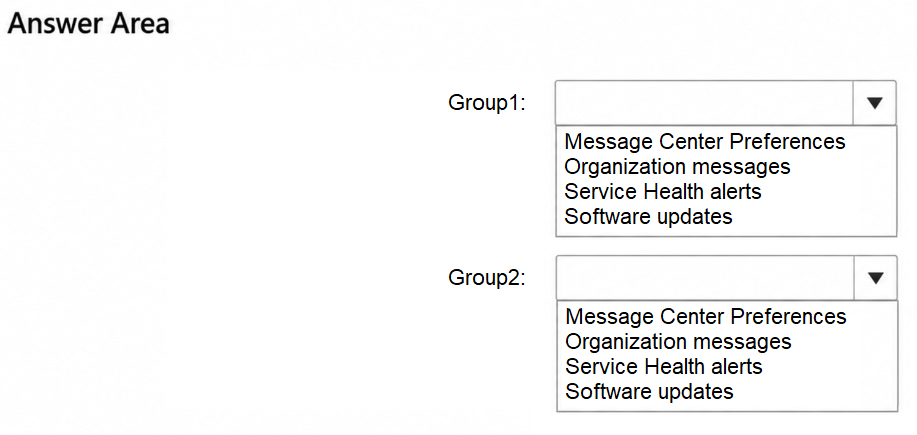
Item 1

  1. AA. Message Center Preferences
  2. BB. Organization messages
  3. CC. Service Health alerts
  4. DD. Software updates

Item 2

  1. AA. Message Center Preferences
  2. BB. Organization messages
  3. CC. Service Health alerts
  4. DD. Software updates
Show answer & explanation

Correct answer: Item 1: A · Item 2: C

ExplanationAnnouncements about major service updates and upcoming changes to Microsoft 365 are published in the Message center, and the Message center Preferences pane is where you add the email addresses that receive those posts (including the option to receive a weekly digest and major update notifications), so Group1 is configured through Message Center Preferences. Operational events such as incidents, advisories, and planned maintenance are published on the Service health page, and Service health notifications (alerts) send email when those events are posted or updated, so Group2 is configured through Service Health alerts. Organization messages deliver in-product messages to end users, and Software updates relate to client update management, so neither meets the requirements. See https://learn.microsoft.com/en-us/microsoft-365/admin/manage/message-center

QUESTION 9

You have a Microsoft 365 subscription that has an initial domain named contoso.onmicrosoft.com and two verified custom domains named contoso.com and fabrikam.com.
The fabrikam.com domain is the default domain.
The contoso.com domain uses managed authentication, and has 750 references across unused user accounts, application identifier URIs, and mail-enabled security groups.
You need to remove contoso.com from the subscription. The solution must minimize manual changes to Microsoft Entra objects.
What should you do?

  1. AA. Convert contoso.com to a federated domain, and then delete contoso.com by using the ForceDelete option.
  2. BB. From the Exchange admin center, remove the contoso.com addresses from the mail-enabled security groups, and then delete contoso.com by using the ForceDelete option.
  3. CC. Make contoso.com the default domain, and then delete contoso.com by using the ForceDelete option.
  4. DD. Manually rename all 750 references to contoso.onmicrosoft.com, and then delete contoso.com.
Show answer & explanation

Correct answer: B

ExplanationThe ForceDelete option performs an asynchronous operation that renames the UPN, email address, and proxy address of users, the email address of groups, and the identifierUris of applications from contoso.com to the initial contoso.onmicrosoft.com domain, so it removes the need to update the 750 references manually. ForceDelete requires fewer than 1,000 references (750 qualifies) and a managed, non-federated, non-primary domain, but references provisioned by Exchange, such as mail-enabled security groups and distribution lists, must first be cleaned up in the Exchange admin center or the operation fails. Making contoso.com the default domain would block the deletion, and converting the domain to federated authentication prevents ForceDelete from working at all. See https://learn.microsoft.com/en-us/entra/identity/users/domains-manage

QUESTION 10

HOTSPOT -
You have a Microsoft 365 subscription that contains a security group named Group1.The object ID of Group1 is stored in a PowerShell variable named $groupId.
You have a CSV file named C:\Temp\members.csv that contains a column named memberObjectId. The column stores the directory object ID of each user that will be added to Group1.
You need to perform a bulk membership update for Group1 by using Microsoft Graph PowerShell.
How should you complete the script? To answer, select the appropriate options in the answer area.
NOTE: Each correct selection is worth one point.
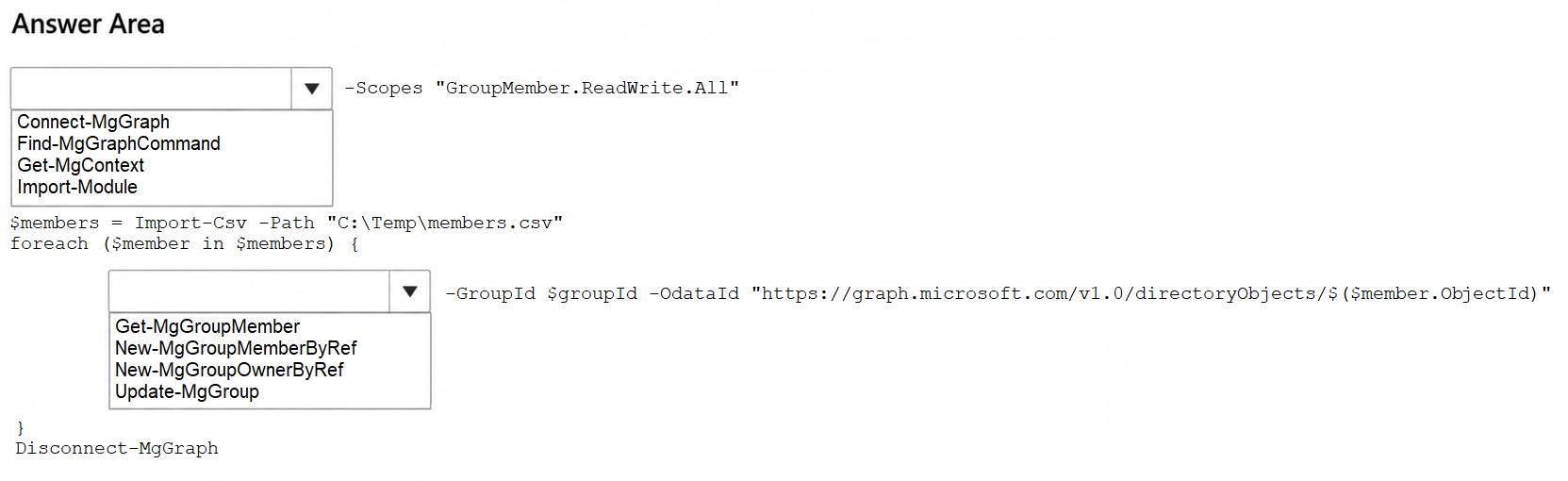
Item 1

  1. AA. Connect-MgGraph
  2. BB. Find-MgGraphCommand
  3. CC. Get-MgContext
  4. DD. Import-Module

Item 2

  1. AA. Get-MgGroupMember
  2. BB. New-MgGroupMemberByRef
  3. CC. New-MgGroupOwnerByRef
  4. DD. Update-MgGroup
Show answer & explanation

Correct answer: Item 1: A · Item 2: B

ExplanationConnect-MgGraph is the cmdlet that authenticates the Microsoft Graph PowerShell session and accepts the -Scopes parameter to request the GroupMember.ReadWrite.All permission needed to change group membership. Inside the loop, New-MgGroupMemberByRef adds an existing directory object to a group and takes exactly the -GroupId and -OdataId parameters shown, where the OData ID points to https://graph.microsoft.com/v1.0/directoryObjects/{id}. Get-MgGroupMember only reads membership, New-MgGroupOwnerByRef adds owners instead of members, and Update-MgGroup changes group properties rather than membership. See https://learn.microsoft.com/en-us/powershell/module/microsoft.graph.groups/new-mggroupmemberbyref

QUESTION 11

You have a Microsoft 365 subscription that contains a distribution list named Group1.
Group1 does NOT have nested groups and is used by project members to send emails.
You need to provide the project members with group-based collaboration resources. The solution must meet the following requirements:
Enable group owners to manage the membership of Group1
Provide a shared calendar and shared files
Support Microsoft Teams integration

Minimize administrative effort -
What should you do?

  1. AA. Convert Group1 to a mail-enabled security group.
  2. BB. Create a new Microsoft 365 group, add the members of Group1 to it, and then delete Group1.
  3. CC. Create a SharePoint team site and a shared mailbox, and then grant access to the members of Group1.
  4. DD. Upgrade Group1 to a Microsoft 365 group.
Show answer & explanation

Correct answer: D

ExplanationA Microsoft 365 group provides a shared mailbox and calendar, a SharePoint document library for shared files, owner-managed membership, and it can be used to create a team in Microsoft Teams. The Microsoft 365 admin center and the Exchange admin center can upgrade an eligible distribution list in place, which keeps the existing address and members and therefore minimizes administrative effort; a distribution list is eligible when it is a cloud-managed simple list without nested groups, which is the case for Group1. A mail-enabled security group adds no collaboration workloads, and recreating the group manually or building a site plus a shared mailbox separately requires far more administrative work. See https://learn.microsoft.com/en-us/microsoft-365/admin/manage/upgrade-distribution-lists

QUESTION 12

HOTSPOT -
You have a Microsoft 365 E5 subscription.
You need to configure a group naming policy.
Which portal should you use, and to which types of groups will the policy apply? To answer, select the appropriate options in the answer area.
NOTE: Each correct selection is worth one point.
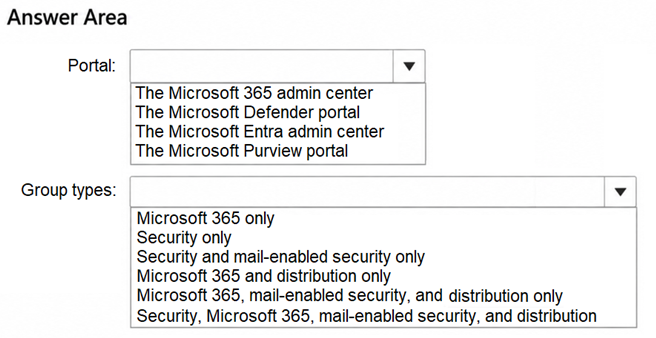
Item 1

  1. AA. The Microsoft 365 admin center
  2. BB. The Microsoft Defender portal
  3. CC. The Microsoft Entra admin center
  4. DD. The Microsoft Purview portal

Item 2

  1. AA. Microsoft 365 only
  2. BB. Security only
  3. CC. Security and mail-enabled security only
  4. DD. Microsoft 365 and distribution only
  5. EE. Microsoft 365, mail-enabled security, and distribution only
  6. FF. Security, Microsoft 365, mail-enabled security, and distribution
Show answer & explanation

Correct answer: Item 1: C · Item 2: A

ExplanationThe group naming policy is a Microsoft Entra ID feature that is configured in the Microsoft Entra admin center under Groups > All groups > Naming policy, where you define the prefix-suffix naming convention and upload the custom blocked words list; it requires Microsoft Entra ID P1 licensing, which the E5 subscription includes. The policy is enforced only for Microsoft 365 groups that are created from any workload (Outlook, Teams, SharePoint, Planner, Viva Engage, and the admin portals); security groups, mail-enabled security groups, and distribution groups are not affected. See https://learn.microsoft.com/en-us/entra/identity/users/groups-naming-policy

QUESTION 13

HOTSPOT -
This is a case study. Case studies are not timed separately from other exam sections. You can use as much exam time as you would like to complete each case study. However, there might be additional case studies or other exam sections. Manage your time to ensure that you can complete all the exam sections in the time provided. Pay attention to the Exam Progress at the top of the screen so you have sufficient time to complete any exam sections that follow this case study.

To answer the case study questions, you will need to reference information that is provided in the case. Case studies and associated questions might contain exhibits or other resources that provide more information about the scenario described in the case. Information provided in an individual question does not apply to the other questions in the case study.
A Review Screen will appear at the end of this case study. From the Review Screen, you can review and change your answers before you move to the next exam section. After you leave this case study, you will NOT be able to return to it.

To start the case study -
To display the first question in this case study, select the “Next” button. To the left of the question, a menu provides links to information such as business requirements, the existing environment, and problem statements. Please read through all this information before answering any questions. When you are ready to answer a question, select the “Question” button to return to the question.
Contoso, Ltd. is a consulting company that has a main office in San Francisco and a branch office in Dallas.


Existing Environment -

Microsoft Entra configuration -
Contoso has an Azure subscription.
Contoso has a Microsoft 365 E5 subscription.
Contoso has a Microsoft Entra tenant named contoso.com. The tenant has an administrative unit named AU1 that contains the following membership rule.
(device.deviceTrustType –eq “Workplace”) and (device.deviceOSType –in [“Windows”, “Android”])
The tenant contains the cloud-only users shown in the following table.

The tenant contains the groups shown in the following table.

The tenant contains the devices shown in the following table.

All the devices are managed by using Microsoft Intune.
Microsoft Entra authentication methods
Contoso contains an Authentication methods policy for Microsoft Authenticator that has the following settings:

Include: Group1 -

Exclude: Group3 -
Authentication mode: Passwordless
Privileged Identity Management (PIM) configuration
Privileged roles are managed by using Privileged Identity Management (PIM).
The PIM settings for the AI Administrator role are configured as shown in the following table.


Email configuration -
Each user has a Microsoft Exchange mailbox.
Contoso contains an anti-spam outbound policy named Antispam1 that has the following configurations:

Included groups: Group4 -

Excluded users: User2 -
Set an external message limit: 3
Set an internal message limit: 5

Set a daily message limit: 13 -
Restriction placed on users who reach the message limit: Restrict the user from sending mail
Microsoft SharePoint configuration
Contoso has a Microsoft SharePoint site named Site1 that stores the following types of content and various other documents:
Project documents: All the documents have a project code that includes the letters PR, followed by a dash and nine digits (for example PR-123456789).
Proposal documents: All the documents have a customer ID that includes seven to 10 alphanumerical characters. All the customer IDs are recorded in a Microsoft Excel workbook.
Feedback forms: All the documents were created by using the same template.

Microsoft AI services -
Contoso implements the following Microsoft AI services:
Microsoft 365 Copilot for selected users
Microsoft Foundry agents, including an agent named Agent1


Requirements -

Planned changes -
Contoso plans to implement the following changes:
Issue new Android devices to the Group1 users.
Assign Microsoft 365 Copilot licenses to the users in Group1.
Add an additional email address alias for the users in Group4.
Create a Conditional Access policy named CAPolicy1 for Group3.
Disable web search for Microsoft 365 Copilot and Microsoft 365 Copilot Chat.
Create classifiers to identify project documents and proposal documents stored on Site1.

Technical requirements -
Contoso identifies the following technical requirements:
The users in Group3 that access Microsoft 365 resources from anonymous IP addresses must complete multifactor authentication (MFA).
Microsoft 365 Copilot responses must NOT use content from the project documents stored on Site1.
Microsoft 365 Copilot responses must use content from only Microsoft 365 locations.
The total costs of Agent1 must be monitored and evaluated monthly.
All the Android devices must be registered in Microsoft Entra.
Administrative effort must be minimized.
Administrative costs must be minimized.
You need to implement CAPolicy1. The solution must meet the technical requirements.
Which two Conditional Access settings should you configure? To answer, select the appropriate settings in the answer area.
NOTE: Each correct selection is worth one point.
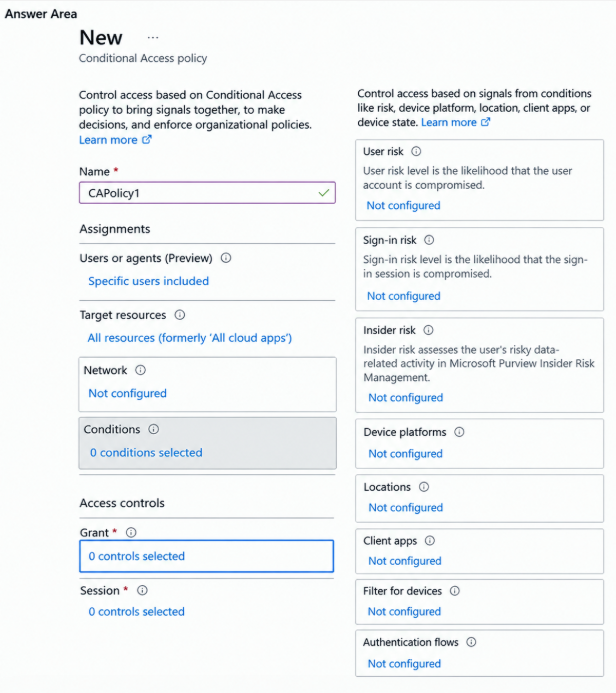
    Show answer & explanation

    Correct answer:

    ExplanationAnonymous IP address is a real-time Microsoft Entra ID Protection sign-in risk detection, which is raised when a sign-in originates from an anonymous IP address such as a Tor browser or anonymizer VPN; there is no Conditional Access condition that names anonymous IP addresses directly and the Locations condition can only evaluate named locations that you define. Therefore CAPolicy1 must use the Sign-in risk condition (for example, Low and above) under Conditions, and under Access controls the Grant control must be set to Grant access and Require multifactor authentication so that the Group3 users complete MFA. Name and the user assignment for Group3 are already configured in the answer area. See https://learn.microsoft.com/en-us/entra/identity/conditional-access/policy-risk-based-sign-in

    QUESTION 14

    You have a Microsoft 365 subscription that contains a Microsoft SharePoint communication site named Site1 and a security group named Group1.
    Some users that are outside of Group1 have direct permissions or sharing links to the content in Site1.
    You need to ensure that users can access Site1 and its content only when they meet both of the following conditions.
    The user is a member of Group1.
    The user has SharePoint permissions to the content.
    The solution must meet the following requirements:
    Apply only to Site1.
    Preserve the existing SharePoint permissions.
    Minimize administrative effort.
    What should you do?

    1. AA. Change Site1 to a private team site that is connected to a Microsoft 365 group that contains the members of Group1.
    2. BB. Create a Conditional Access policy that targets Office 365 SharePoint Online and includes only Group1.
    3. CC. Enable a site-level restricted access control policy for Site1 and specify Group1.
    4. DD. Remove all direct permissions and sharing links from Site1, and then grant Group1 permissions to the site.
    Show answer & explanation

    Correct answer: C

    ExplanationRestricted access control (site-level access restriction) in SharePoint Advanced Management limits access to a single site to the members of one or more specified Microsoft Entra groups. Users who are not in the group lose access even if they hold direct permissions or previously received sharing links, while members of the group still need SharePoint permissions on the content, which is exactly the two-condition requirement. The policy is applied per site, so it affects only Site1, and it leaves the existing SharePoint permission structure intact, so administrative effort is minimal. A Conditional Access policy applies to the whole SharePoint Online service rather than one site, and rebuilding permissions or recreating the site as a group-connected team site would change the existing permissions. See https://learn.microsoft.com/en-us/sharepoint/restricted-access-control

    QUESTION 15

    You have a Microsoft 365 subscription.
    You create a retention label named Retention1 as shown in the following exhibit.
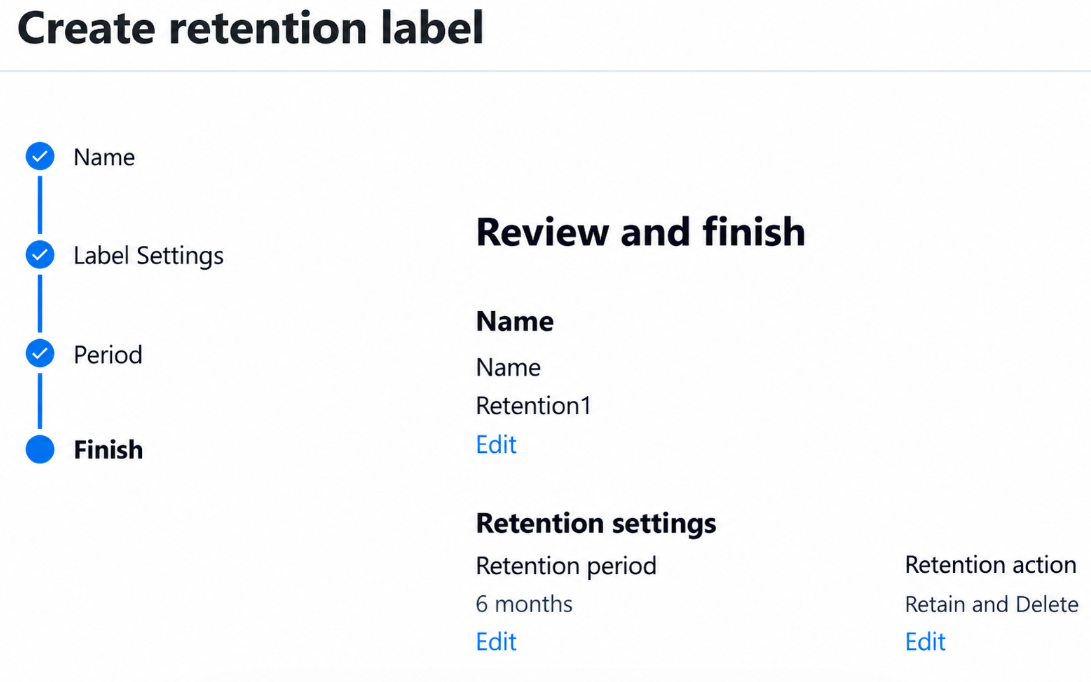
    You apply Retention1 to all the Microsoft OneDrive content.
    On January 1, 2025, a user stores a file named File1 in OneDrive.
    On January 10, 2025, the user modifies File1.
    On February 1, 2025, the user deletes File1.
    When will File1 be removed permanently and unrecoverable from OneDrive?

    1. AA. On February 1, 2025
    2. BB. On March 3, 2025
    3. CC. On July 1, 2025
    4. DD. On July 10, 2025
    Show answer & explanation

    Correct answer: C

    ExplanationRetention1 retains and then deletes content for six months, and the retention period is calculated from when the items were created, so the retention period for File1 runs from January 1, 2025 to July 1, 2025. Modifying the file on January 10, 2025 does not restart the clock, and deleting the file on February 1, 2025 does not remove it: because the file is still within its retention period, SharePoint and OneDrive copy it to the Preservation Hold Library, where it remains unrecoverable-for-the-user but preserved for compliance. When the six-month retention period expires on July 1, 2025, the retain-and-delete action permanently deletes the item from the Preservation Hold Library. See https://learn.microsoft.com/en-us/purview/retention

    QUESTION 16

    You are testing a data loss prevention (DLP) policy to protect the sharing of credit card information with external users.
    During testing, you discover that a user can share credit card information with external users by using email. However, the user is prevented from sharing files that contain credit card information by using Microsoft SharePoint.
    You need to prevent the user from sharing the credit card information by using email and SharePoint.
    What should you configure?

    1. AA. Add Exchange email as a location to the DLP policy and configure the rule to block sharing with people outside the organization.
    2. BB. Create a new sensitive information type for credit card numbers.
    3. CC. Create an Exchange Online mail flow rule that blocks messages sent to external recipients.
    4. DD. Lower the instance count and the match accuracy of the Credit Card Number sensitive information type in the DLP policy.
    Show answer & explanation

    Correct answer: A

    ExplanationA Microsoft Purview DLP policy only inspects the workloads that are selected as locations. Because the policy already blocks credit card data in SharePoint but email is unrestricted, the Exchange email location is missing from the policy. Adding Exchange email as a location and keeping the rule action that blocks sharing with people outside the organization extends the same Credit Card Number detection and block action to messages sent externally, while the existing SharePoint protection is unchanged. The sensitive information type already works (SharePoint detects it), so creating a new one or changing its instance count and confidence level is unnecessary, and a mail flow rule would duplicate DLP outside the unified policy. See https://learn.microsoft.com/en-us/purview/dlp-policy-reference

    QUESTION 17

    HOTSPOT -
    You have a Microsoft 365 subscription that contains the users shown in the following table.
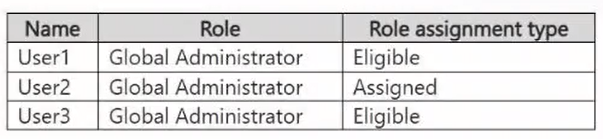
    The Global Administrator role has the Privileged Identity Management (PIM) settings shown in the following table.
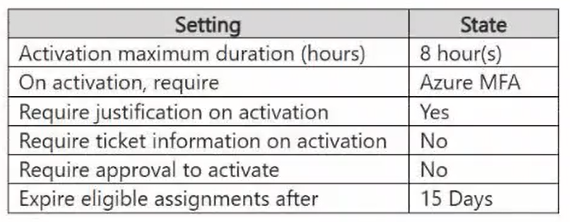
    For each of the following statements, select Yes if the statement is true. Otherwise, select No.
    NOTE: Each correct selection is worth one point.
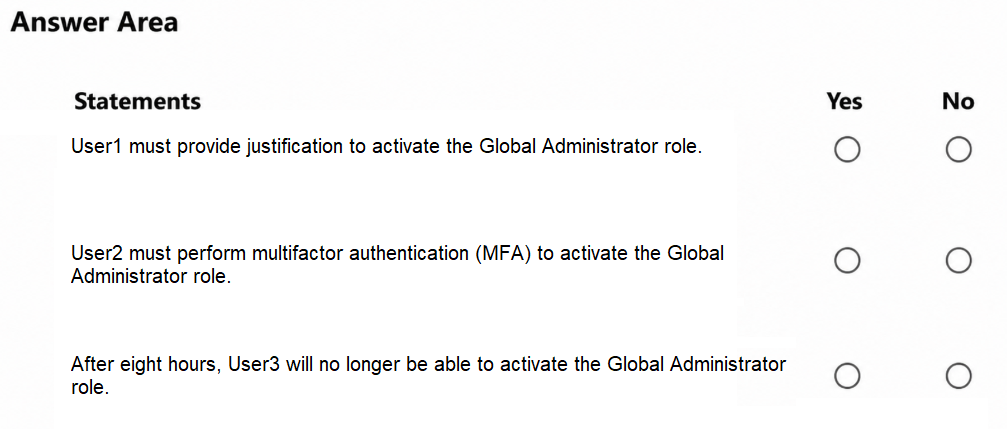
    1. AUser1 must provide justification to activate the Global Administrator role.
    2. BUser2 must perform multifactor authentication (MFA) to activate the Global Administrator role.
    3. CAfter eight hours, User3 will no longer be able to activate the Global Administrator role.
    Show answer & explanation

    Correct answer: Y, N, N

    ExplanationThe PIM role settings for Global Administrator set Require justification on activation to Yes, and User1 holds an eligible assignment, so User1 must activate the role and must supply a justification; the first statement is true. User2 holds an active (assigned) role assignment, which means the role is permanently active and User2 never performs an activation, so the On activation, require Azure MFA setting does not apply and the second statement is false. The value of eight hours is the Activation maximum duration, which caps how long an activated role stays active; it does not end eligibility. User3 remains eligible until the eligible assignment expires after 15 days, so User3 can still activate the role after eight hours and the third statement is false. See https://learn.microsoft.com/en-us/entra/id-governance/privileged-identity-management/pim-how-to-change-default-settings

    QUESTION 18

    You have a Microsoft 365 subscription.
    You need to create a Conditional Access policy that blocks sign-ins for the following scenarios:
    Activity from anonymous IP address.
    Impossible travel between two geographical locations.
    Which condition should you configure for the policy?

    1. AA. Device platforms
    2. BB. Locations
    3. CC. Sign-in risk
    4. DD. User risk
    Show answer & explanation

    Correct answer: C

    ExplanationAnonymous IP address and impossible travel (atypical travel between two geographical locations) are both Microsoft Entra ID Protection risk detections that are evaluated for an individual authentication request, so they contribute to the sign-in risk level rather than to the user risk level. Configuring the Sign-in risk condition in the Conditional Access policy and pairing it with a Block access grant control therefore blocks exactly these scenarios. User risk reflects the probability that the identity itself is compromised (for example, leaked credentials), the Locations condition only evaluates named locations or countries that you define, and Device platforms filters by operating system. See https://learn.microsoft.com/en-us/entra/id-protection/concept-identity-protection-risks

    QUESTION 19

    You have a Microsoft 365 E5 subscription that uses Microsoft Defender for Office 365. Strict protection is enabled for all recipients.
    The subscription contains a group named Group1 that contains all the mailboxes for your company’s marketing department.
    Several marketing department mailboxes recently sent high volumes of external email after a credential was compromised.
    You need to enforce a lower external message limit for Group1. The solution must automatically restrict senders that reach the limit.
    What should you do?

    1. AA. Create a custom outbound spam filter policy that applies to Group1, set a lower external message limit, and set the action to Restrict the user from sending mail.
    2. BB. Create a mail flow rule that rejects messages sent to external recipients by the members of Group1.
    3. CC. Modify the default outbound spam filter policy and lower the external message limit for the organization.
    4. DD. Modify the Strict preset security policy and lower the external message limit for Group1.
    Show answer & explanation

    Correct answer: A

    ExplanationOutbound spam policies are not part of the Standard or Strict preset security policies; members of a preset are protected by the default outbound spam policy, and you customize their outbound protection by creating a custom outbound spam policy that applies to them. Creating a custom outbound spam filter policy scoped to Group1 lets you set a lower value for Set an external message limit and choose the action Restrict the user from sending mail, which adds a sender that exceeds the limit to the Restricted entities list until an admin removes it. Preset policies cannot be edited, changing the default policy would affect every mailbox in the tenant rather than only Group1, and a mail flow rule would block external email outright instead of enforcing a recipient-rate limit with automatic restriction. See https://learn.microsoft.com/en-us/defender-office-365/outbound-spam-policies-configure

    QUESTION 20

    HOTSPOT -
    You have a Microsoft 365 E5 subscription.
    You need to enable passwordless authentication for all users.
    Which authentication method and portal should you use? To answer, select the appropriate options in the answer area.
    NOTE: Each correct selection is worth one point.
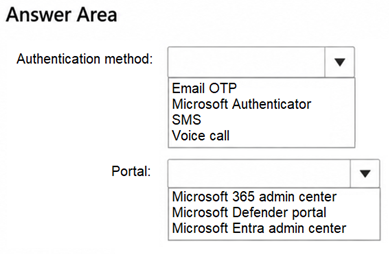
    Item 1

    1. AA. Email OTP
    2. BB. Microsoft Authenticator
    3. CC. SMS
    4. DD. Voice call

    Item 2

    1. AA. Microsoft 365 admin center
    2. BB. Microsoft Defender portal
    3. CC. Microsoft Entra admin center
    Show answer & explanation

    Correct answer: Item 1: B · Item 2: C

    ExplanationMicrosoft Authenticator supports passwordless phone sign-in, where the user approves a notification and matches a number instead of entering a password; Email OTP, SMS, and voice call are password-replacement or verification methods that are not passwordless sign-in methods for Microsoft Entra ID. Passwordless phone sign-in is enabled in the Authentication methods policy, which is managed in the Microsoft Entra admin center under Entra ID > Authentication methods, where the Microsoft Authenticator method is enabled, targeted at All users, and set to Passwordless authentication mode. See https://learn.microsoft.com/en-us/entra/identity/authentication/howto-authentication-passwordless-phone

    Build a focused AB-650 practice routine.

    Choose AB-650 in Revizo and work through original, question-by-question practice on your iPhone. Review results, revisit what needs attention and keep your next session tied to one specific certification objective.

    Practise AB-650 with Revizo

    AB-650 practice questions.

    Is Revizo the official Microsoft exam?

    No. Revizo is an independent iPhone app for certification practice. Refer to the provider's official resources for current exam policies and registration.

    How should I use these AB-650 practice questions?

    Use the exam code to select the matching certification in Revizo, then build short, focused sessions around the areas you want to review.

    Are Revizo questions copied from live examinations?

    No. Revizo provides original practice questions for certification study. Use the provider's official objectives, documentation and policies as the source of truth for your preparation.

    What should I use alongside AB-650 practice questions?

    Use the current Microsoft objectives, documentation and registration guidance as your source of truth. Revizo is designed to support focused practice, not replace the provider's official materials.

    Where can I confirm current AB-650 requirements?

    Check the official Microsoft exam page for the latest objectives, registration details and policies.